
What Is a REST API: Resources, Methods and JSON Explained
What Is a REST API? Learn resources, HTTP methods, JSON responses and status codes with a practical integration example.

A REST API is a way for programs to read and change data on a server using standard HTTP requests, usually exchanging JSON. If that's all it is, why do so many integrations break not on the first call, but on the retry, the second page, or the duplicate record nobody noticed?
That gap is where most beginner explanations stop. They list verbs, show a tidy create, read, update, delete example, and leave you to discover production behavior on your own. A more useful way to learn what is a REST API is to connect every concept to what your client should do next. When a request times out, do you send it again? When a list spans many pages, how do you avoid skipping records? When the server says wait, how long do you wait? Those questions turn abstract terms into working code.
Table of Contents
- What a REST API Is in Plain Terms
- Resources, URLs and JSON Representations
- HTTP Methods and What Each One Does
- Requests, Responses and Status Codes
- JSON Structure in REST Responses
- Make and Verify Your First REST Call
- Keep Integrations Reliable at Scale
What a REST API Is in Plain Terms
Start with a restaurant. The menu lists what you can order, the waiter carries your request to the kitchen and brings back the dish, and you never enter the kitchen yourself. In that picture, the API is the menu and the waiter together. The server, with its database and internal logic, is the kitchen. You don't need to know how the kitchen stores ingredients to order a meal. You only need to know what's on the menu, how to place an order, and what you'll get back.
REST gives that waiter a consistent set of rules. REST, meaning Representational State Transfer, is an architectural style for networked software rather than a programming language, database, or standalone protocol, as Roy Fielding's doctoral dissertation at the University of California, Irvine sets out. Fielding developed the first version of the model between October 1994 and August 1995 while helping define HTTP/1.0 and the initial HTTP/1.1 proposal, refined it over the following five years, and formally introduced it in 2000.
That history matters because REST didn't invent a new network. It adapted the Web's existing, globally deployed architecture for programmatic access, so the same URLs and HTTP verbs work for a browser, a mobile app, a script, or an AI agent. You're reusing infrastructure that caches, proxies, and browsers already understand instead of learning a specialized messaging system for every service.
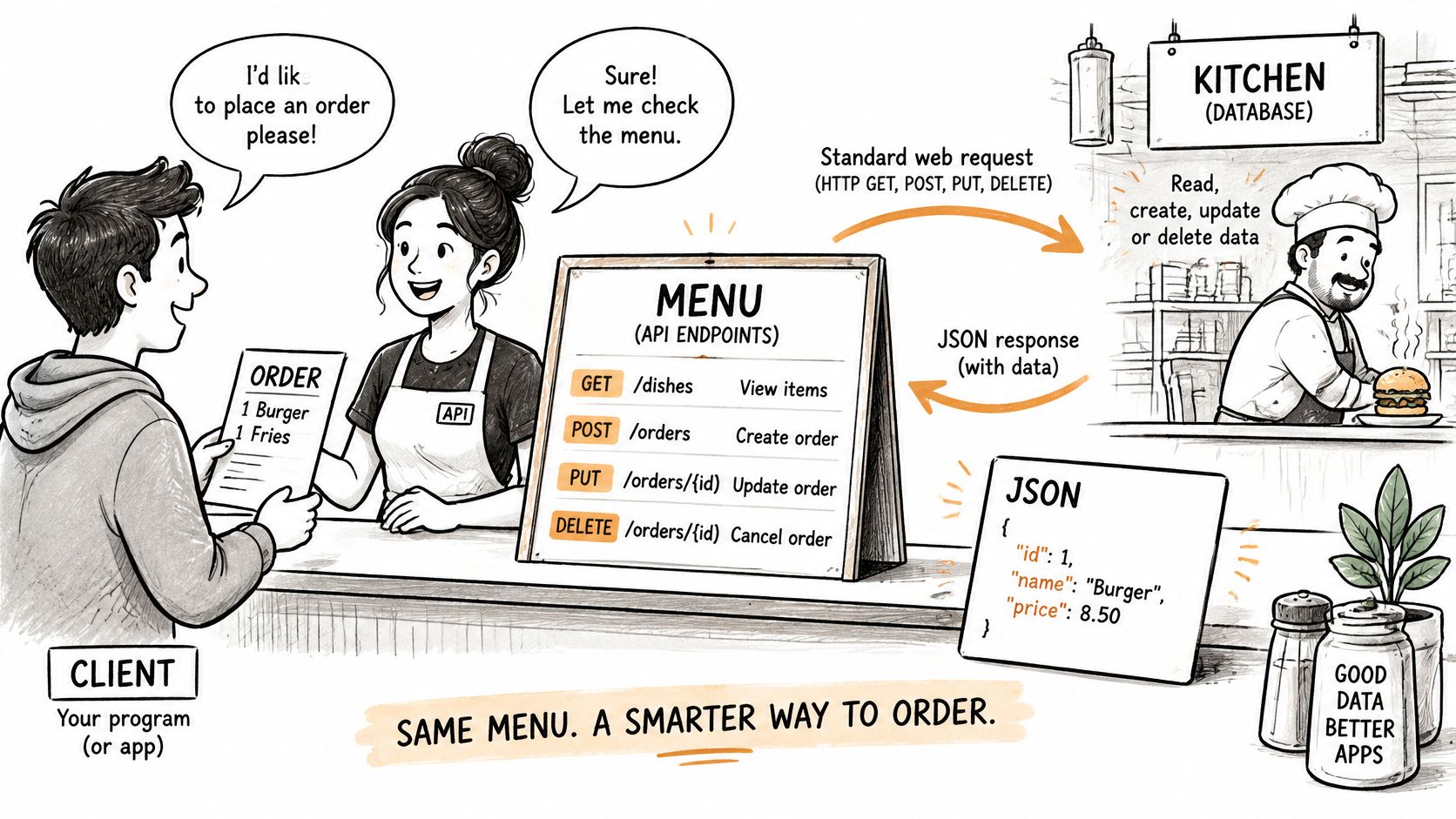
It's also the style you're most likely to meet first. In Postman's 2025 State of the API Report, REST was used by 93% of API developer teams, while webhooks were used by 50%, WebSockets by 35%, and GraphQL by 33%. Learn REST well and you can read most public API documentation without starting over each time.
Practical rule: Treat REST as a set of agreements about naming, verbs, and replies, not as a library you install.
Resources, URLs and JSON Representations
Look at one familiar collection first. A request to /users lists accounts. A request to /users/42 identifies one account. A request to /users/42/posts lists that account's posts. Notice what's missing. There are no verbs like getUser or fetchPosts in those paths, because the HTTP method already carries the action.
Resources Are the Nouns
A resource is a thing your API exposes, such as a user, a post, or a comment. Each resource gets an identifier, its URI, and clients use that address every time they want that thing. As Fielding's description of the REST architectural style puts it, a REST API is designed around resources rather than procedure calls, with constraints including a uniform interface, stateless client-server interactions, and cacheable responses.
| Resource | Collection URI | Returned representation |
|---|---|---|
| Users | /users | JSON object with profile fields |
| Posts | /users/{id}/posts | JSON object with caption, timestamp and counts |
| Comments | /posts/{id}/comments | JSON object with text and author ID |
| Hashtags | /hashtags/travel/posts | JSON list of post objects |
The pattern generalizes from those rows. A collection path uses a plural noun. A single item adds its identifier. A nested path shows ownership or relationship, such as comments belonging to a post. Once you see the nouns, you can predict addresses you haven't used yet, which is exactly what good naming should let you do.
A Representation Is Not the Database Row
When you request /users/42, the server doesn't hand you its internal database row. It returns a representation, usually a JSON document describing that account in fields the API chooses to expose. The same resource can have more than one representation, and the client can state its preference through the Accept header. That separation lets the server reorganize its storage without breaking every client, as long as the representation stays stable.
Statelessness shapes what you send. Every request must carry the context the server needs, including your authentication token, filters, and pagination cursor, because the server doesn't depend on stored session state from earlier calls. That helps any server instance handle your request, but it puts responsibility on your code to include everything, every time. Forgetting the cursor or token isn't a small omission. It's a different, incomplete request.
List the nouns in your data before you call any endpoint. If you can't name the resource, you can't build its URL.
HTTP Methods and What Each One Does
The method is the verb in each request, and the same URL changes meaning when the verb changes. GET /users/42 reads an account. DELETE /users/42 would remove it. The address stays put. The intent moves.
| Method | Purpose | Safe | Idempotent |
|---|---|---|---|
| GET | Retrieve a representation | Yes | Yes |
| POST | Create a resource or trigger processing | No | No |
| PUT | Replace a resource entirely | No | Yes |
| PATCH | Change only the fields sent | No | Not guaranteed |
| DELETE | Remove a resource | No | Yes |
Reading and Creating
GET retrieves the representation of /users/42 and changes nothing on the server. That's what safe means. You can repeat it, cache it, and let monitoring tools call it without side effects. POST does the opposite kind of work. A POST to /users/42/posts creates a new post under that account and typically returns 201 Created with the new identifier, which your client should store so it can address that post directly later.
Replacing, Patching and Removing
PUT replaces the whole resource. If you PUT a profile and leave out the bio field, the server may clear the bio, because your document claims to be the complete new version. PATCH is narrower. It changes only the fields you send, so correcting a caption doesn't require resending timestamps, counts, and every other field you didn't touch. DELETE removes the resource, such as a comment, and usually returns 204 No Content.
The last two columns decide what you do after a failure. An idempotent request can be repeated and produce the same final state. Repeating a PUT writes the same document again. Repeating a DELETE leaves the resource absent. POST has no such guarantee. If a POST times out after the server created the record but before you saw the reply, a blind retry can create a second record. PATCH sits in between, since a patch that says increase a counter behaves differently on repetition than a patch that sets a caption to a fixed value.
That's why creating requests need protection. Send an idempotency key, a unique value the server can recognize on a retry, or use a deterministic identifier your client generates once. Then a repeated submission returns the original result instead of duplicating work.
Rule of thumb: Read with GET, create with POST, and use PATCH unless you genuinely mean to replace the whole object.
Requests, Responses and Status Codes
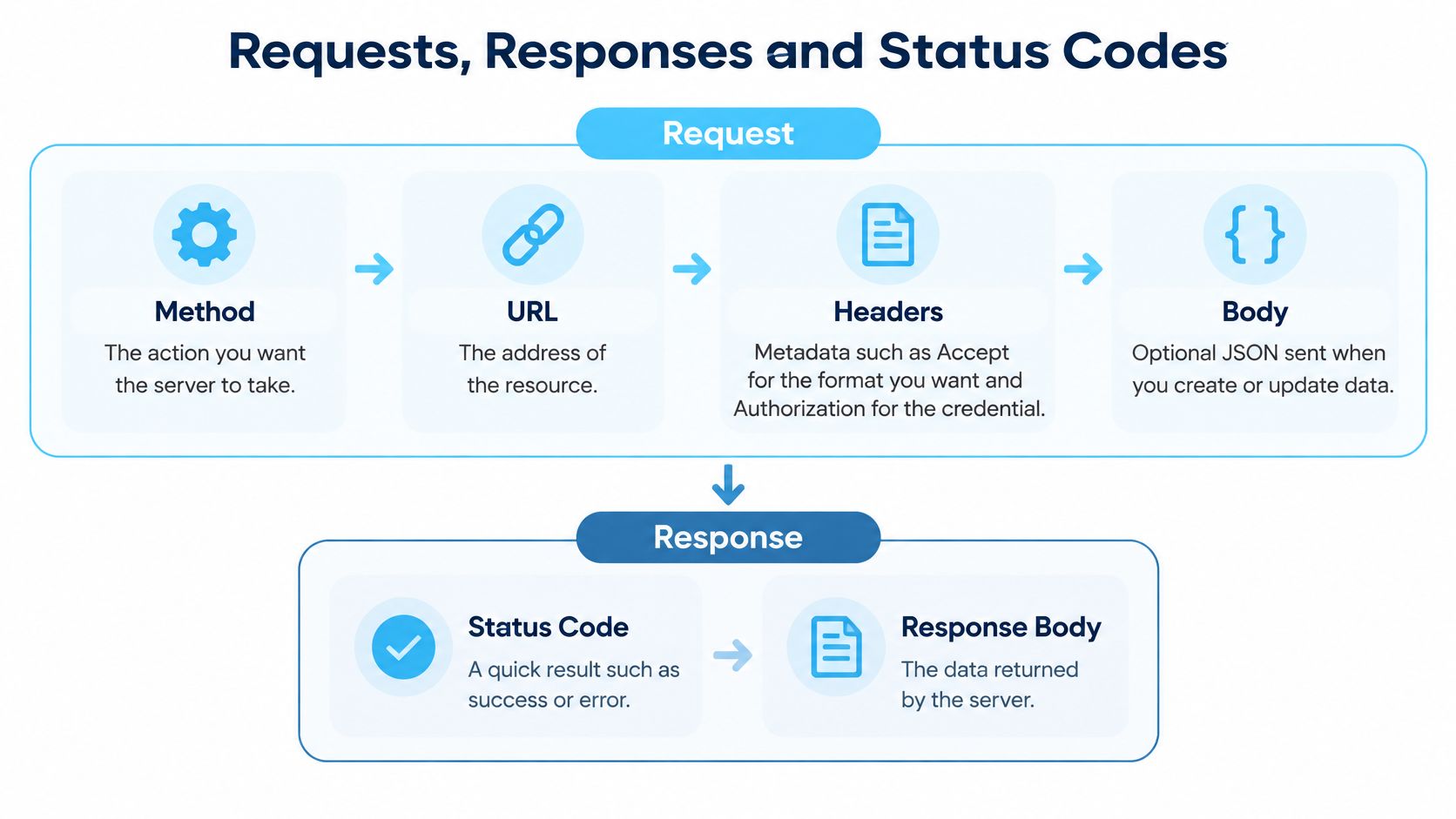
Think of one exchange in order. Your client builds a request, the server processes it, and the reply tells you both the outcome and, when things go well, the data. Every REST call you make follows that sequence, whatever the resource.
The Four Parts of a Request
- Method: The action you want, such as GET or POST.
- URL: The address of the resource, including any query parameters for filtering or paging.
- Headers: Metadata such as Accept for the format you want and Authorization for your credential.
- Body: Optional JSON you send when creating or updating data. A plain GET normally has no body.
The credential header deserves care, since a missing or expired token is one of the most common first failures. If you're unsure how keys and bearer tokens differ, work through how API key authentication works in practice before debugging anything else. Many apparent API bugs are often the right request sent without proof of who you are.
Reading the Reply
A response carries a status line, headers such as Content-Type set to application/json, and usually a body. Say you send a GET for a user. A successful reply returns 200 OK and a JSON object with fields such as id, username, and follower count. Before you touch those fields, check the code. The Django REST Framework status code guide reflects the standard grouping where 2xx indicates success, 4xx indicates a client-side problem such as invalid input or missing authorization, and 5xx indicates a server-side failure.
| Code | Meaning | Typical cause | What to do |
|---|---|---|---|
| 200 OK | Request succeeded and a body is returned | Normal read | Parse the JSON body |
| 201 Created | New resource was created | Successful POST | Store the returned identifier |
| 204 No Content | Success with no body | Successful DELETE | Do not parse a body |
| 400 Bad Request | Request is malformed | Invalid JSON or missing field | Fix the request before retrying |
| 401 Unauthorized | Credential is missing or invalid | Absent or expired token | Send or refresh the credential |
| 403 Forbidden | Authenticated but not allowed | Insufficient permission | Check scope and access |
| 404 Not Found | Resource does not exist | Wrong identifier or path | Check the URL and ID |
| 429 Too Many Requests | Rate limit reached | Too many calls in a window | Wait for Retry-After, then back off |
Read the table as instructions, not trivia. A 4xx response is a reason to fix something in your request, not to resend it unchanged and hope. Resending a malformed body produces the same 400. Resending an expired token produces the same 401. A 5xx response points at the server, so waiting and retrying later makes sense there in a way it doesn't for client errors.
Always read the status code before parsing the body. An error body has a different shape from a success body, so code that immediately looks for a username field will fail confusingly on an error reply that never contained one. Branch on the code first. Then parse the body that matches that branch.
JSON Structure in REST Responses
JSON is the text format most REST responses use, and it has only a few building blocks. Learn to recognize them and you can read almost any response without documentation open beside you.
Objects, Arrays and Values
An object is a set of key and value pairs wrapped in curly braces. A user object might carry the keys id, username, follower_count, is_verified, and bio. An array is an ordered list wrapped in square brackets, which is what a collection such as /users/42/posts returns. Inside both, values follow strict rules. Strings sit in double quotes, numbers have no quotes, booleans are true or false, and null means the field has no value.
Those rules explain the slips beginners make most often. Quoting a number turns it into a string, so sorting and arithmetic break downstream. A trailing comma after the last item makes the whole body invalid JSON, so a strict parser rejects it. Assuming a field is always present fails the first time the API returns null for an account with no bio. Read defensively. Check the type you received instead of trusting the type you expected.
Collections, Nesting and Errors
A collection response usually wraps its array in a key such as data and includes a next link for the following page. Read the array from the data key, and keep the next link rather than guessing the next address yourself. Nested fields are read by path. The caption of the first post is the first element of the data array, then its caption key. If you can walk that path out loud, you can write the code for it.
Error bodies have a different shape, typically an error object with a code, a message, and a request identifier. That's another reason to check status before reading fields. Consistent structure is also what makes API output usable beyond your own script, a point developed in Agentable's take on agent data needs, since automated tools depend on predictable fields arriving in predictable places.
If a field can be null, your code will eventually meet null. Handle it on the first day, not after the first crash.
Make and Verify Your First REST Call
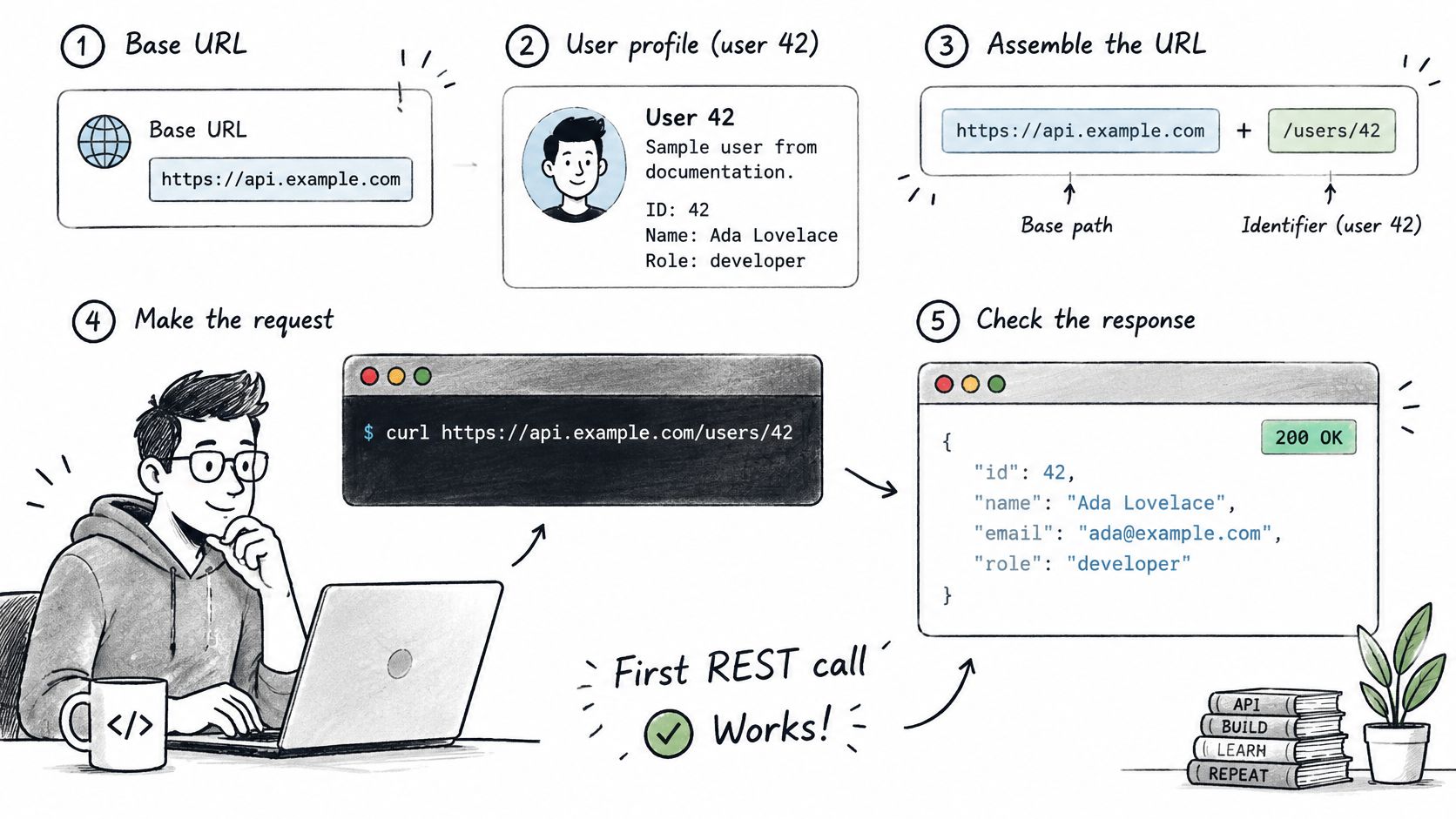
A first REST call works like a test phone call to a new contact. You dial one known number, confirm who picks up, and only then save the details. Fetching a single user profile from the base URL in your provider's documentation is that known number: one GET exercises the whole request and response cycle with no pagination and no writes in the way.
Each step has a characteristic slip, and the diagram maps the sequence before the detail.
Build and Send the Request
- Pick the resource and identifier: Choose one known item, such as user 42, so you can check the response against a real record.
- Build the URL: Combine the base path, the resource name, and the identifier, giving a path like base/users/42. The action stays out of the address because GET already says what you want done.
- Set your headers: Send Accept as application/json and add the credential header your provider requires. A missing credential header commonly causes a 401 Unauthorized response.
- Send the GET: Use cURL, Python requests, or JavaScript fetch, and keep the request inside one reusable function rather than scattering copies through your code. If Python is your language, a worked guide to calling an API from Python shows the same steps in runnable form.
Check, Parse and Log
- Check the status code first: 200 means continue, 4xx means fix the request, and 5xx means retry later. That three-way split is what tells your client which action to take next, and parsing before checking hides a real failure behind confusing field errors.
- Parse the JSON body: Read the identifier and username, then confirm they match the account you asked for.
- Handle errors deliberately: Read the error body and log the status code and request identifier. That identifier is what support teams and your own logs need to trace one specific call out of thousands.
Watching one exchange end to end fixes the sequence in memory better than rereading the steps.
Verify Before You Build on It
Verification is the step beginners skip, and the one that saves them later. Confirm that one GET to a single resource returns 200 with Content-Type set to application/json. Read two or three fields and compare them with the documentation. Then force a 404 with a wrong identifier and confirm your code reads the error body cleanly instead of crashing.
That deliberate error is a true test. A client that handles a forced 404 will handle accidental ones the same way, and a client that checks Content-Type will catch an unexpected response format before it reaches the parser. Together those checks mean every later feature sits on an exchange you have already watched succeed and fail.
For a live test endpoint, our Instagram API is a REST API for public Instagram data that accepts JSON and returns JSON, using one bearer token for authentication with no Instagram login or OAuth. The OpenAPI spec at api.profilequery.com/openapi.json works with Swagger and Redoc, Postman, SDK generators, and agent tool loaders like ChatGPT Actions and LangChain, so the same checklist applies against a documented contract.
Keep Integrations Reliable at Scale
Most REST failures at scale don't announce themselves. Collections can be large and can change while you're reading them, so duplicated records, skipped pages, or an exhausted quota can corrupt analytics or AI agent outputs without any visible error. Your pipeline finishes, your dashboard fills, and the numbers are wrong. Reliability work exists to prevent exactly that.
This isn't a niche concern. In Gartner's 2024 API Strategy Survey, 82% of surveyed organizations reported using APIs internally, while 71% used APIs provided by third parties such as SaaS vendors. When that many workflows depend on other people's endpoints, client behavior under pressure becomes a core skill.
Four Rules That Prevent Silent Damage
- Follow the server's page links: Use bounded page sizes and follow the next links the server returns instead of building page URLs yourself. Hand built pages can skip records inserted mid read or repeat records that shifted between pages.
- Respect 429 responses: When the server returns 429 Too Many Requests, honor Retry-After and any rate limit reset header rather than retrying immediately. Instant retries deepen the overload and can extend your penalty.
- Back off and time out: Retry with exponential backoff and a small random delay, and set timeouts so one stalled request doesn't hang your whole pipeline. Spreading retries out also stops many clients from surging back at the same second.
- Retry only what's safe to repeat: GET requests can be retried freely. A creating POST needs an idempotency key before any retry, or a timeout can leave you with two records where you wanted one.
Caching cuts the work further. When the server returns an ETag, send If-None-Match on later reads and accept 304 Not Modified instead of downloading the body again. For profiles or metadata you poll often, that saves bandwidth and time on every unchanged check. Teams applying these patterns to monitoring workflows, such as those built on a social listening API for tracking mentions and posts, feel the benefit quickly because they reread the same resources on a schedule.
Choosing who builds or maintains that integration layer is its own decision, and it helps to compare UK API integration providers on how they handle pagination, retries, and error contracts rather than on endpoint counts alone. The verbs are the easy part. Behavior under failure is the product.
Put these rules to work on real data instead of toy examples. Our Instagram API returns structured JSON for public profiles, posts, comments, and discovery endpoints through standard REST requests with one bearer token, so you can practice status handling, pagination, and safe retries against live responses today.
Pull Instagram data with one API call
Profiles, posts, reels, followers and more. 50 free credits, no credit card.
Get your free key