
Python Call API: How to Make Requests and Read JSON
Python Call API guide: send requests with the requests library, handle status codes and timeouts, and parse JSON safely in your scripts.

You have the URL open in a browser. The JSON is right there, clean and readable, and now you need that same data inside a script instead of copied by hand into a spreadsheet. That gap is where most Python call API work starts, and it's also where beginners get stuck, not on the request itself, but on what happens when the server is slow, the token is wrong, or the response changes shape. Getting JSON to print is the easy part. Keeping the script reliable after that first success is the bigger challenge.
Table of Contents
- Make Your First API Call in Python
- Check Permissions Before You Automate
- Pick the Right Python HTTP Library
- Send Parameters, Headers and JSON Bodies Correctly
- Handle Status Codes, Timeouts and Retries
- Validate and Use the JSON Response
- Test One Real Endpoint Before Building More
Make Your First API Call in Python
Start with an endpoint that needs no key, so you can separate learning the mechanics from debugging authentication. The public GitHub repository endpoint for psf/requests works well. Paste it into a browser first and you'll see a JSON object with fields like stargazers_count and open_issues_count. That's the exact payload your script should receive.
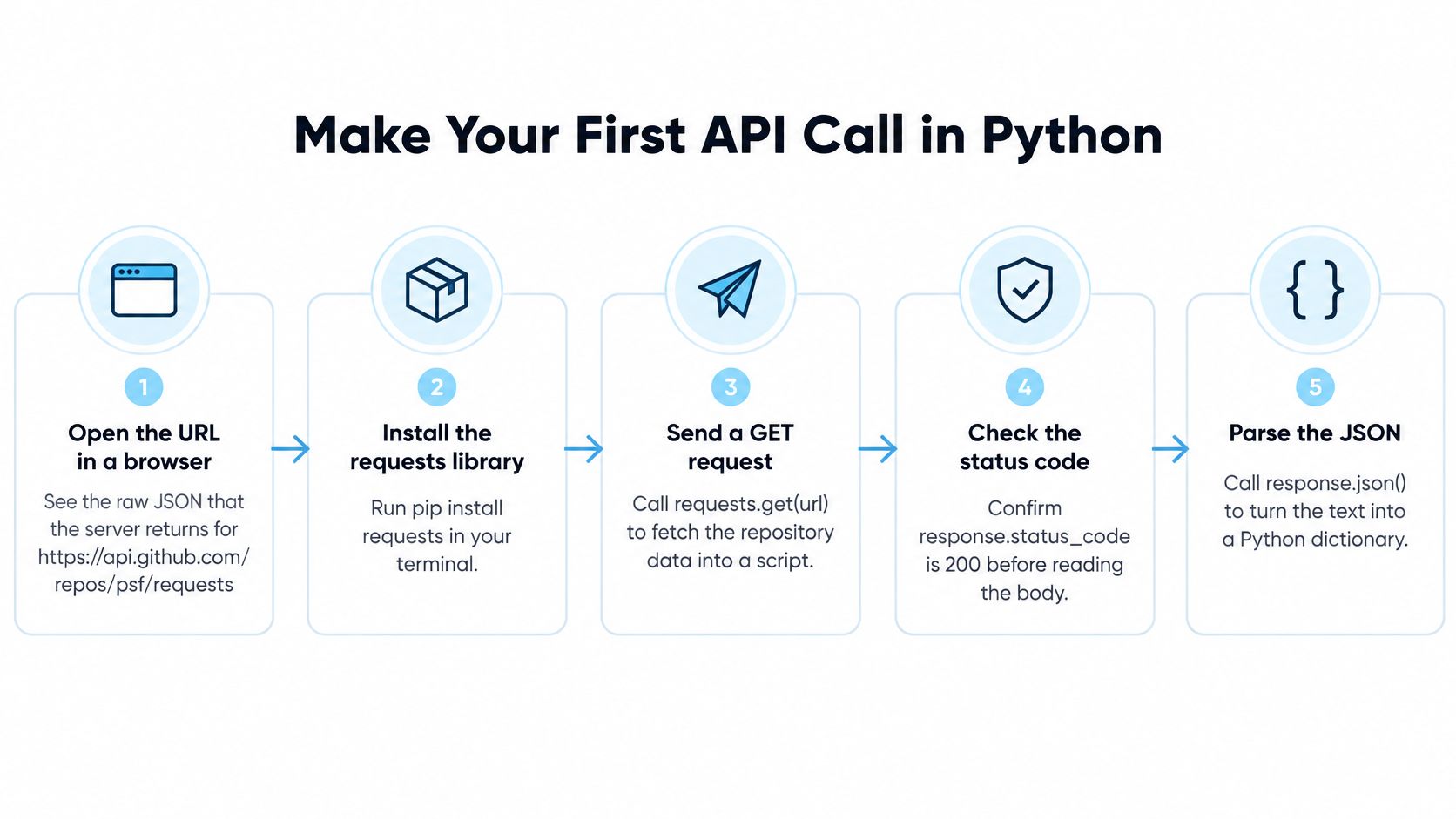
The seven steps
- Install the library. Run
pip install requestsso imports don't fail on a fresh machine. - Store the address in parts. Import requests, then keep the base URL and endpoint path in separate variables. You'll change one without hunting through a long string.
- Build headers separately. Create a headers dictionary. For a keyed API, read the token with
os.environ, never by pasting it into the source file where it can leak into version control. - Use a params dictionary. Put query values in params so requests encodes spaces and symbols correctly instead of you building the query string by hand.
- Send with a timeout. Call
requests.get(url, headers=headers, params=params, timeout=10). The timeout matters because requests has no default timeout, so a call without one can hang indefinitely on a stuck connection. - Fail fast on errors. Call
response.raise_for_status()so a 4xx or 5xx stops the script early instead of feeding an error page into your parser. - Read one field. Call
response.json()and print a single value, such as the star count, to confirm real data arrived.
The same pattern holds when you move from a public demo to a keyed service. Our overview of an API for social media shows how those endpoints are organized, but the request mechanics don't change.
A healthy result means status 200, a Python dictionary you can index by key, and fields that match what the endpoint documentation promises.
If any of those three checks fails, don't add more code yet. Fix the request first, because everything downstream assumes that foundation is sound.
Check Permissions Before You Automate
A 200 response proves your code works. It doesn't prove you're allowed to collect, store, or use what came back. Those are three separate questions, and treating them as one is the mistake that gets scripts shut down after they're already in production.
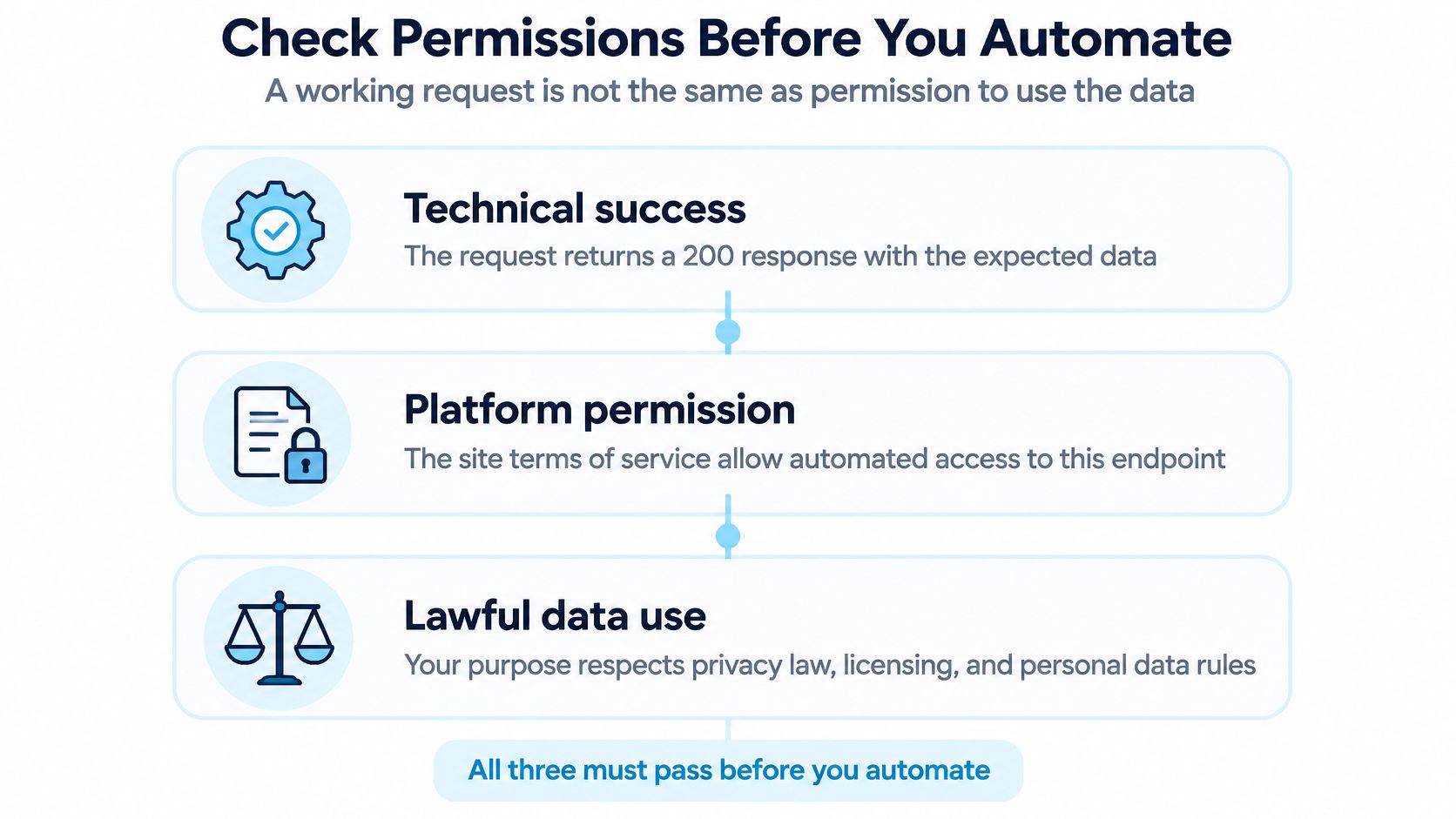
A provider's terms can prohibit automated collection even when data is visible in a browser. A guide to social media scraping legality and technique makes the point that Instagram's terms prohibit automated collection without permission, while privacy obligations can still apply to publicly visible personal data. GDPR and California privacy rules can apply even when information was publicly viewable, and U.S. case law concerning public web data doesn't eliminate contract or privacy risk.
Run this checklist before you write the loop
- Public or authenticated only: If data sits behind a login, automated access needs explicit permission, not borrowed credentials.
- Terms permit automation: Check the provider's terms for the specific endpoint, not just the site in general.
- No access controls bypassed: If collecting means evading authentication, rate limits, or private content restrictions, stop.
- Personal data identified: Names, photos, and handles can be personal data. Document your lawful basis, such as consent or a legitimate interest assessment.
- Purpose and retention written down: State why you're collecting and how long you'll keep it, before the first scheduled run.
- Deletion workflow exists: You need a way to remove a person's data when they ask or when retention expires.
- Explicit do not collect list: Name the fields and account types you'll never touch, so scope doesn't creep later.
This is an engineering checklist, not legal advice. When any answer is unclear, a permissioned official API is usually the right route, because permission is built into the access instead of assumed from a working request.
Pick the Right Python HTTP Library
Use requests for most scripts and backend services. Reach for httpx or aiohttp when you need async calls, and use urllib.request only when you can't add a dependency.
| Library | Install needed | JSON decoding | Async support | Best fit |
|---|---|---|---|---|
| urllib.request | No, ships with Python | Manual with json.loads | No | One-off scripts and locked-down environments |
| requests | Yes, pip install requests | response.json() | No | Most scripts, backend services and scheduled jobs |
| httpx | Yes, pip install httpx | response.json() | Yes | Async services and code that mixes sync and async calls |
| aiohttp | Yes, pip install aiohttp | await response.json() | Yes | High-concurrency clients calling many endpoints at once |
The standard library is more capable than many beginners expect. The Python documentation for urllib.request describes a module designed to open URLs with built-in handling for authentication, redirects, cookies, and HTTP request processing. Its companion modules split the job cleanly. urllib.parse constructs URLs, urllib.error represents request exceptions, and urllib.robotparser processes robots.txt files.
The cost is manual work. You build the query string yourself, decode the body with json.loads, map HTTPError and URLError to your own handling, and write retry logic from scratch. That's fine for a one-off script. Move to requests when you want automatic JSON decoding, connection pooling, or mounted retries.
Choose httpx when one service mixes synchronous and asynchronous calls, since its API stays consistent across both. Choose aiohttp when a single process fires many concurrent requests at many endpoints and throughput matters more than symmetry.
Send Parameters, Headers and JSON Bodies Correctly
The most common silent failure isn't a crashed script. It's a token pasted into the URL, or a dictionary sent as form data when the API expects JSON. The server responds, your code runs, and the result is wrong in a way that's hard to spot.
| Input | requests argument | Where it goes | Common mistake |
|---|---|---|---|
| Query values such as page or limit | params={'page': 2} | After the ? in the URL | Building the query string by hand and missing encoding for spaces or symbols |
| Bearer token or API key | headers={'Authorization': f'Bearer {token}'} | Request header | Putting the token in the URL, where it leaks into logs and browser history |
| JSON body for create or update | json={'name': 'Ada'} | Request body, Content-Type set to application/json | Sending a dict with data=, which encodes it as a form instead |
| Form-encoded body | data={'grant_type': 'client_credentials'} | Request body, Content-Type application/x-www-form-urlencoded | Passing a JSON string to data= and forgetting the header |
| Accept or version header | headers={'Accept': 'application/json'} | Request header | Omitting it and receiving HTML from an error page |
Say you're calling our user search endpoint documentation pattern, where the search term belongs in params and your key belongs in the Authorization header. Swapping those two places either leaks the key or breaks the search.
Habits that prevent quiet breakage
- Reuse one Session: A single
requests.Sessionacross calls to the same host keeps connections open instead of renegotiating each time. - Timeout on every call: Setting it once doesn't carry over. Each get or post needs its own timeout argument.
- Never log Authorization: Redact that header in exception messages and debug output, because logs get shared when you ask for help.
- Keep the base URL in configuration: Switching between test and production hosts becomes one change, not a search and replace.
- Check Content-Type before json(): An HTML error page will raise a confusing decode error if you parse it blindly.
A POST that creates a resource and returns 201 shows why the argument choice matters. Passing json= serializes your dictionary and sets Content-Type to application/json for you. Passing data= form-encodes the same dictionary, and many APIs reject it or store empty fields.
Handle Status Codes, Timeouts and Retries
Learn one rule first. A 4xx response usually means your request is wrong, and retrying won't fix it. A 429 or 5xx response may succeed later, so a bounded retry makes sense there.
| Status | What it usually means | Retry? | Fix |
|---|---|---|---|
| 429 Too Many Requests | Rate limit reached | Yes, after Retry-After | Wait the Retry-After delay, then back off exponentially |
| 502, 503, 504 | Gateway, service unavailable or upstream timeout | Yes, honour Retry-After on 503 | Retry with exponential backoff and jitter |
Status codes alone don't tell the whole story, which is why typed error codes in the body matter. We return an error with code invalid_api_key when the API key is invalid or has been revoked, so your code can stop and report a credential problem instead of retrying. A missing_parameter code means a required field, such as the handle, wasn't sent. Both are requests you must fix, not retry.
Catch exceptions by type
Requests raises distinct exception classes, and catching them separately makes logs useful. Timeout means the server didn't respond within your limit. ConnectionError means the network path failed before a response arrived. HTTPError surfaces when raise_for_status() sees a 4xx or 5xx. A single broad except block hides which one happened, and you'll guess during an incident instead of knowing.
Configure retries instead of hoping
Retries aren't automatic. The Requests API documentation on max_retries covers the low-level configuration, and the library doesn't retry failed connections by default. Its retry handling applies to DNS failures, socket connections, and connection timeouts, not to requests where data may already have reached the server.
Mount an HTTPAdapter with a urllib3 Retry object on your session. Set total=3, a backoff_factor, status_forcelist=[429, 502, 503, 504], and respect_retry_after_header=True so your client honors the server's requested delay. Add jitter so many clients don't retry in lockstep and recreate the spike.
Practical rule: Retry transient failures with patience, fix client errors with code changes, and never retry a POST unless the endpoint is idempotent or you send an idempotency key.
For credit-based retrieval, log the request ID, endpoint, status, latency, and billing metadata, and stop retrying when a response may have charged credits or produced a partial result. Three attempts is a sensible default, but calibrate it from the 429 and 5xx rates you observe. The practical detail in these API reliability tips from Mallary.ai is worth reading alongside your own logs before you raise that cap.
Validate and Use the JSON Response
The dangerous failure is quiet. An API returns 200 with an empty array or a renamed field, your pipeline keeps running, and bad data reaches analytics or a CRM before anyone notices. Validation is how you catch that at the boundary instead of weeks later.
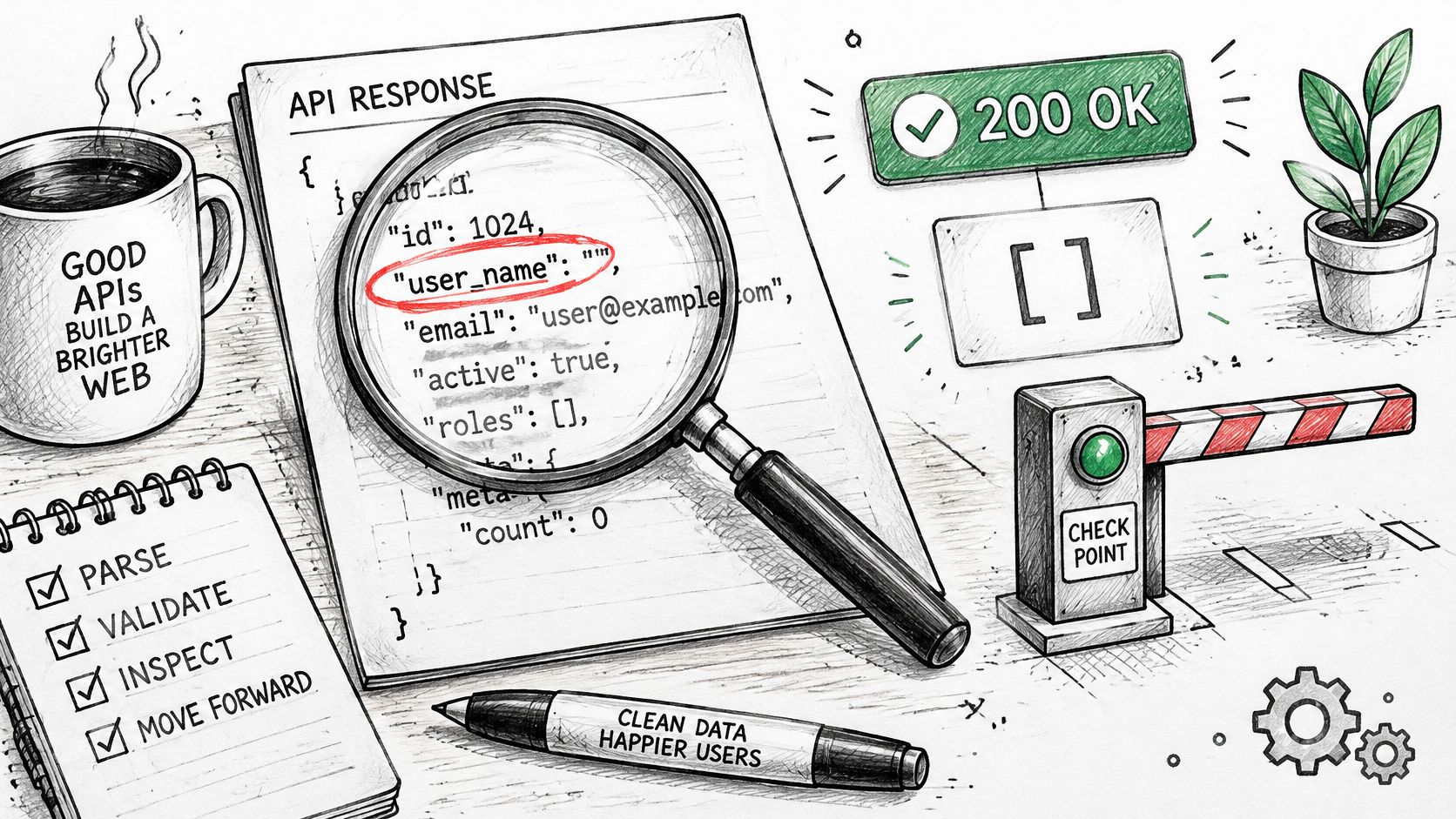
Seven validation steps
- Check status before parsing. Nothing in the body is trustworthy until you know the request succeeded.
- Enforce a maximum size. Read the Content-Length header first so a runaway response can't exhaust memory.
- Parse inside a try block. Call
response.json()and catch ValueError, since invalid JSON raises a decoding error. - Verify envelope fields. Check documented metadata such as success, data, request identifier, credits charged, remaining balance, and processing time.
- Validate field types with a schema. The python-jsonschema documentation supports formal schema validation, so a string where you expect an integer fails loudly.
- Separate empty states. A missing field, a null value, an empty list, and the end of pagination each mean something different downstream.
- Save raw and normalized records. Keeping both lets you replay a response and audit what your code received.
This walkthrough shows response inspection in practice.
Watch your defaults, too. With the psf/requests example, data.get('stargazers_count', 0) returns zero if the field disappears, which looks like a real count. Direct indexing with data['stargazers_count'] raises an error instead. Use direct indexing for fields your logic depends on, and reserve .get() defaults for values that are genuinely optional.
Schema checks confirm shape, not truth. A syntactically valid username can still belong to no account, so semantic checks still belong in your code. If an AI agent consumes the endpoint, reject outputs that fail validation before exposing them to the model, and return machine-readable error codes.
Lock the behavior in with contract tests for successful profiles, not-found responses, rate limits, upstream failures, malformed parameters, and depleted credits. When a provider changes response shape, a failing test tells you before production data does.
Test One Real Endpoint Before Building More
Run one real request end to end before you build the full integration. That single call will teach you more about the actual response than an hour of reading field descriptions.
- Pick one endpoint and read its documentation fully. Our profile endpoint documentation is a good model of what to check.
- Confirm permission for that specific data and purpose before sending anything.
- Send the request with requests and an explicit timeout.
- Apply status checks and read any typed error code in the body.
- Validate the envelope and fields against a schema.
- Record the evidence: status, latency, request identifier, and credits charged.
Compare your code against the provider's examples, since we provide example requests in cURL, JavaScript, and Python. You can also load the OpenAPI specification into Postman or Swagger to generate request stubs, since it works with Swagger and Redoc, Postman, SDK generators, and agent tool loaders like ChatGPT Actions and LangChain. Our documentation includes a live request tester where you enter an API key, handle, and cursor to send a test request that uses 2 credits, so your first look at the actual response shape costs very little.
If your users sit in different countries, take time to validate region-dependent API responses rather than assuming one location's result represents everyone's. Then make the honest decision. Build further if the data shape fits your workflow, or stop if it doesn't.
When you're ready to apply this pattern to public Instagram data, Instagram API gives you structured JSON for profiles, posts, comments, and search through one bearer token, with Python examples you can drop into the request and validation code above. Start with a single profile call, check the envelope fields and credits charged, and only then scale up your script.
Pull Instagram data with one API call
Profiles, posts, reels, followers and more. 50 free credits, no credit card.
Get your free key