
Scraping Using Python: A Practical Guide for 2026
Scraping Using Python step by step: requests, parsing, retries, legal checks, and when an API fits better.

Your catalogue scraper worked on Monday. By Friday, it still finishes without an error, but the export contains empty names and prices. Say the page still shows forty product cards in your browser. The problem isn't whether Python can download it, it's whether your pipeline can recognize that the data has changed.
Scraping using Python means building a small data system, not just writing selectors. The version you can ship needs bounded requests, validation, recoverable failures, and a decision about whether you should collect the data at all.
Table of Contents
- Build a Python Scraper in Six Stages
- Which Python Library Handles Each Job
- Speed, Concurrency and Reliability at Scale
- Check Legal and Privacy Limits Before You Scrape
- Scrape or Call an API for Your Project
- Pick Your Path and Run a Small Pilot
Build a Python Scraper in Six Stages
Define the contract before fetching
Inspect the page and its terms. List the fields you need and where each appears in the returned HTML. Check the response body, not just the browser's rendered page. The common slip is designing selectors for elements that JavaScript creates later.
Bound every request. Set explicit connect and read timeouts. This prevents an unresponsive server from holding a worker indefinitely. Don't mistake a Requests read timeout for a total job deadline, it limits waiting between received bytes.
Parse with stable selectors. Use
lxmlor BeautifulSoup and prefer meaningful attributes over positional paths. A selector such as//span[@class="price"]breaks when the class changes. Don't replace a missing match with an empty string and call it success.
For an introductory walkthrough of page inspection and extraction, explore web scraping with CodeWords, then apply the stricter validation below.
Keep the whole workflow visible while you build:
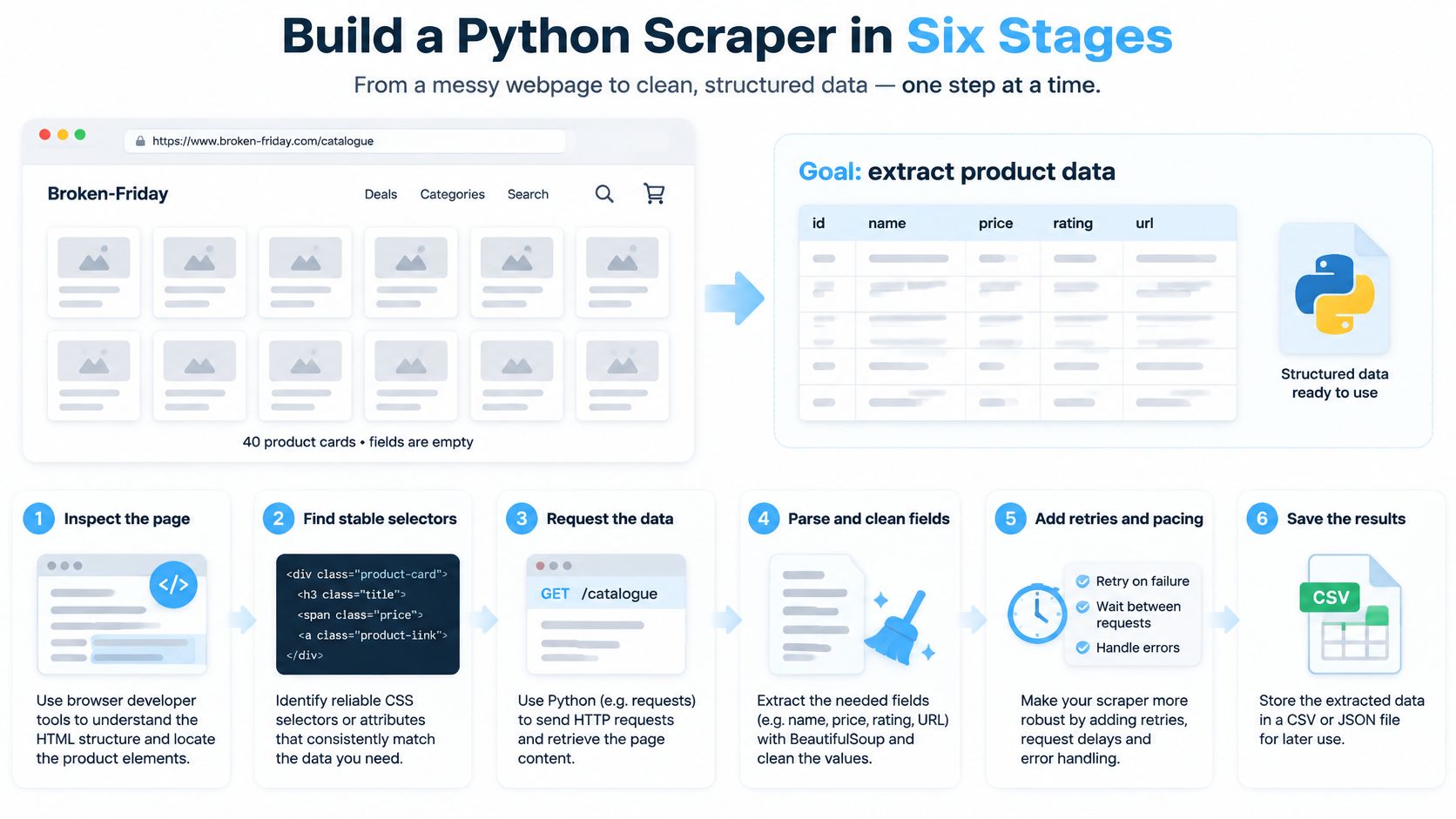
Reject bad records before export
Validate and normalize. Require a name, price, and destination link; resolve relative links with
urljoin. Preserve currency when converting price text to a decimal. A blank price isn't a zero price.Retry transient failures only. Timeouts and selected server errors can justify another attempt with capped exponential backoff. Repeating a missing-page response won't repair the URL. Pause separately for rate limiting and honor server instructions.
Persist replayable inputs. Save raw response bytes before parsing, then save validated records with their source URL. Otherwise, a selector repair requires another crawl. Apply retention and access restrictions to raw bodies too.
Install requests and lxml. Save this as a script and pass an authorized catalogue URL as its argument; adapt the example data-* attributes to the inspected markup.
import json
import sys
import time
from pathlib import Path
from urllib.parse import urljoin

import requests
from lxml import html

def fetch(session, url, attempts=3):
    for attempt in range(attempts):
        try:
            response = session.get(url, timeout=(5, 20))
        except (requests.Timeout, requests.ConnectionError):
            if attempt == attempts - 1:
                raise
        else:
            if response.status_code < 500:
                response.raise_for_status()
                return response
            if attempt == attempts - 1:
                response.raise_for_status()
            response.close()
        time.sleep(min(2 ** attempt, 8))

def required(node, expression):
    value = node.xpath(expression).strip()
    if not value:
        raise ValueError(f"Missing required field: {expression}")
    return value

url = sys.argv[1]
with requests.Session() as session:
    response = fetch(session, url)

Path("response.html").write_bytes(response.content)
tree = html.fromstring(response.content)
cards = tree.xpath('//*[@data-product]')
if not cards:
    raise ValueError("No product cards found")

records = []
for card in cards:
    records.append({
        "name": required(card, 'string(.//*[@data-name])'),
        "price": required(card, 'string(.//*[@data-price])'),
        "url": urljoin(
            response.url,
            required(card, 'string(.//a/@href)')
        ),
    })

Path("records.json").write_text(
    json.dumps(records, ensure_ascii=False, indent=2),
    encoding="utf-8"
)
These timeout and retry values are starting settings, not universal defaults. The snippet keeps price text for a site-specific currency parser and refuses to export if any required field disappears. For repeated runs, replace the fixed filenames with unique capture identifiers and store response metadata alongside them.
Which Python Library Handles Each Job
Python libraries by pipeline role
| Library | Pipeline role | Best when | Renders JavaScript |
|---|---|---|---|
| requests | HTTP fetching with sessions and timeouts | One site, static HTML or public JSON | No |
| lxml | Fast HTML and XML parsing | Large pages or many records per page | No |
| BeautifulSoup | Forgiving HTML parsing | Messy markup and quick prototypes | No |
| Scrapy | Full crawl framework with scheduling and pipelines | Many pages, concurrency and export needed | No, needs an add-on |
| Playwright | Browser automation | Content only appears after scripts run | Yes |
| Selenium | Browser automation | Existing Selenium test suites or legacy flows | Yes |
Start with requests plus lxml for a single site. Requests handles the connection, cookies, headers, and session reuse. lxml turns the response into a searchable document; neither library substitutes for field validation or persistence.
BeautifulSoup provides a convenient interface for navigating awkward markup, although its behavior also depends on the parser backend you select. Use it when readable extraction code matters more than squeezing parser overhead. Don't assume that changing the parser repairs an incorrect field contract.
Choose orchestration separately from parsing
Scrapy becomes useful when you need coordinated scheduling, concurrent downloads, duplicate-request filtering, and item pipelines. You can keep extraction logic separate from output processing instead of extending a hand-written loop into an improvised framework.
Python's troubleshooting ecosystem is substantial: a 2026 Hproxy analysis reported 51,300 web-scraping Stack Overflow questions, with approximately 58% also tagged Python. That's evidence of public technical discussion, not a count of deployed crawlers.
A permitted public endpoint can remove HTML parsing entirely. For a social-data integration, compare the response contract of an Instagram scraper API against the fields your application needs before choosing browser automation.
Tool-selection rule: Use a browser because the workflow requires browser behavior, not because the target has a complicated-looking website.
Playwright fits script-driven pages and interactive flows. Selenium makes sense when your team already maintains Selenium infrastructure. Launching either for every static page adds browser processes, resource downloads, and state management that a direct HTTP request doesn't need.
Speed, Concurrency and Reliability at Scale
The dangerous first crawl isn't necessarily the one that crashes. It's the run of HTTP 200 responses with no usable records. A successful download can contain a consent page, a challenge, or an empty application shell.
Inspect the response your scraper received before optimizing its speed:
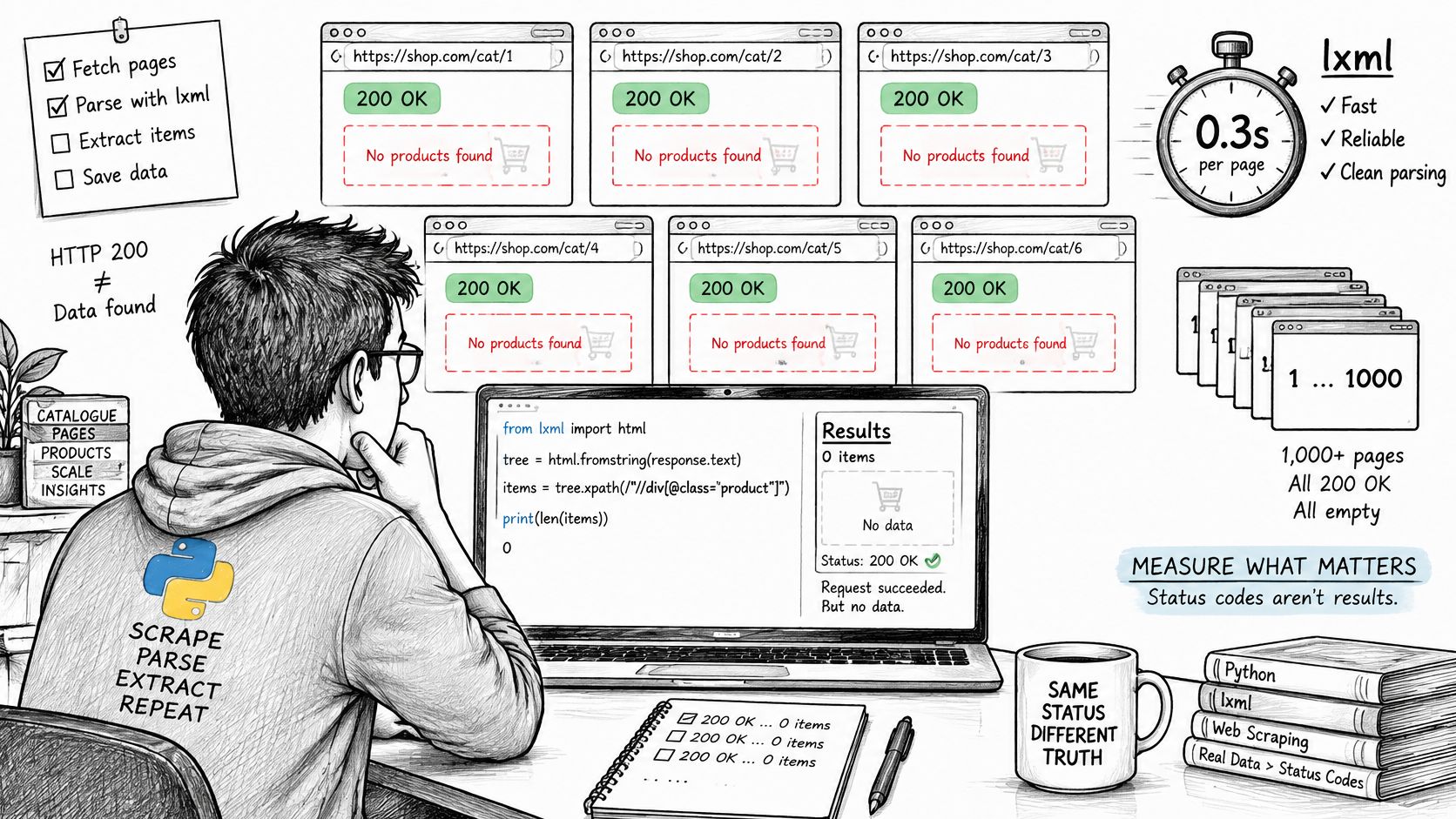
Measure validated output, not just elapsed time
In a HasData controlled benchmark collecting 200 rows across eight catalogue pages, requests + lxml took 3.01 seconds at 43 MB peak RSS, requests + BeautifulSoup took 3.71 seconds at 45 MB, and Scrapy took 3.46 seconds at 81 MB. Those results don't establish a universal winner, but they show why replacing an entire framework to save parser time can be the wrong first fix.
For a modest crawl, inspect repeated parsing, unnecessary requests, and expensive normalization before rewriting the networking layer. Build the document tree once per response. Extract related fields while visiting each card rather than repeatedly searching the entire page.
The comparison changes when scheduling can overlap network waits: a Proxy-Cheap comparison reports 100 pages in 13.0 seconds for sequential requests + BeautifulSoup, versus 3.7 seconds for Scrapy, with peak memory of 46 MB and 94 MB, respectively. The faster completion came with a memory trade-off, and the workloads shouldn't be treated as interchangeable with the smaller catalogue benchmark.
Run your own representative pilot. Include ordinary pages, sparse pages, pagination boundaries, and known unavailable records. Measure validated records per unit of time, not merely requests completed, and keep transport failures separate from extraction failures.
Increase concurrency only while useful throughput improves
Raise per-domain concurrency gradually. If latency rises, rate limiting appears, or extraction completeness drops, reduce pressure rather than adding workers. A crawler that downloads more responses but exports fewer valid records isn't faster in any useful sense.
Use these controls together:
- Connection pooling: Reuse sessions or your framework's downloader connections instead of creating a fresh connection for every request.
- Domain limits: Bound in-flight requests for each host, including when multiple workers share the same queue.
- Pacing: Apply policy-compliant delays, with jitter where appropriate, so workers don't all resume simultaneously.
- Retry budgets: Cap attempts and backoff, and record why each retry occurred.
- Circuit breakers: Pause a domain after repeated failures and require a controlled recovery probe before resuming.
For distributed work, queue background jobs in the cloud with Beam when you need managed task execution. Keep the crawl's rate budget shared across workers, because independent local limits can still overload the same host.
A visual walkthrough can complement response-body inspection and hands-on testing:
Diagnose before retrying
Scraper symptoms, causes and fixes
| Symptom | Likely cause | Fix |
|---|---|---|
| HTTP 200 with empty fields | JavaScript-rendered content or changed markup | Look for a public data endpoint first, then validate selectors against saved bodies |
| Runs that hang for minutes | No request timeouts | Set explicit connect and read timeouts on every request |
| Repeated retries on 404 | Permanent error retried as if transient | Fail fast on permanent client errors; retry timeouts and selected server errors |
| CAPTCHA or incomplete rendered content | Blocking or JavaScript-dependent pages | Pause the domain with a circuit breaker and test for a permitted endpoint |
Rate limiting needs its own handling, not the same policy as a permanent client error. Respect Retry-After when present, lower the request rate, and stop when access isn't permitted.
Log status, latency, extraction completeness, duplicate rate, and retry reason for each request. Include a capture identifier so you can connect a failed record to its saved body without logging unnecessary personal data.
Check the expected MIME type before parsing. Then check card presence, required fields, and semantic validity, such as whether a purported product link points to a product. Preserve representative failure bodies under your retention policy.
A green process exit tells you the script finished. It doesn't tell you the dataset is fit to use.
Check Legal and Privacy Limits Before You Scrape
A page loading in your browser doesn't automatically make it fair game for collection and reuse. The Browserless Python crawler guide highlights that exposure depends on jurisdiction, data type, access method, site terms, and downstream use, and that publicly visible personal data can still carry privacy obligations.
That includes usernames, contact details, and follower lists. Collecting those fields for a defined investigation doesn't automatically justify keeping them for unrelated enrichment.
Use these considerations as a collection gate, not a post-launch review:
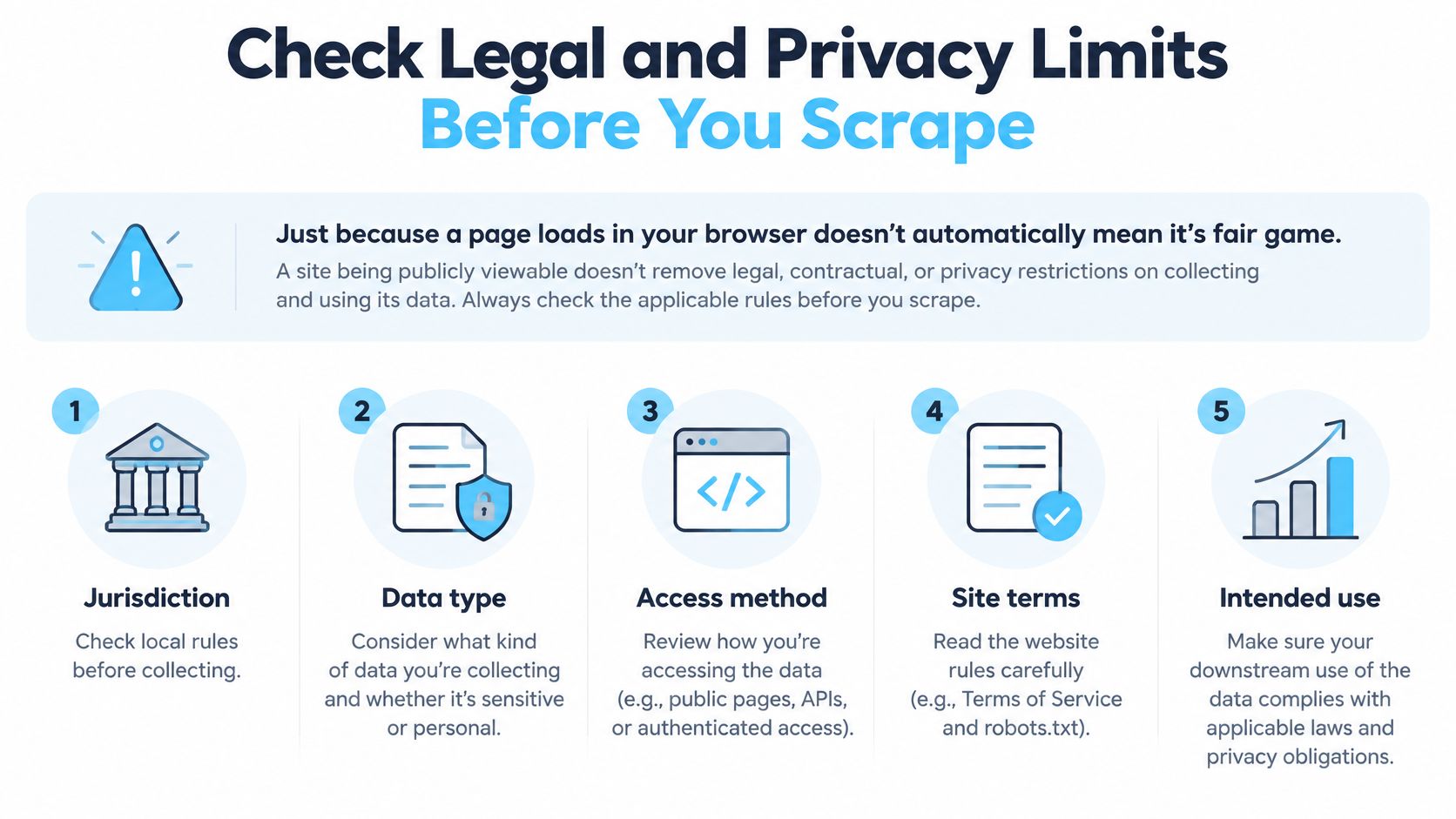
Write down the collection decision
- Authorization: Identify the basis for access. Don't bypass authentication, restrictions, or challenges.
- Terms and crawler preferences: Review site terms and
robots.txt. Crawler preferences aren't a legal grant of permission. - Purpose limitation: Connect each collected field to a specific, documented use.
- Retention: Set a deletion schedule for normalized records, raw responses, and backups.
- Notice and deletion: Determine applicable notice duties and how you'll handle deletion requests.
Ignoring crawler preferences can also weaken an argument that access was authorized. If the access basis or privacy duties are unclear, obtain jurisdiction-specific legal advice before running the collection.
An unofficial Instagram API integration still needs this assessment. Moving retrieval behind an API doesn't establish your right to retain or repurpose the resulting personal data.
Collection boundary: Write the purpose and retention period before sending the first request.
Say you're measuring engagement on an account's posts. If follower identities aren't necessary for that purpose, remove follower lists from the field specification and delete any already stored. Keep only the fields your measurement needs, with a documented reason for each.
Scrape or Call an API for Your Project
Build a scraper or use an API
| Situation | Build a Python scraper | Use an API |
|---|---|---|
| Static pages, one site, no data API | Good fit, low setup cost | Only if the API covers the needed fields |
| Stable JSON fields and typed errors required | You write and maintain validation | Responses follow a documented structure |
| JavaScript-rendered content | Browser tooling and higher CPU use | Often returned directly as structured data |
| Limited legal or compliance capacity | You own every review and retention rule | Provider handles upstream access; you still own your use |
| Frequent site markup changes | You rewrite selectors and retest | Provider absorbs upstream changes |
The decision is about who carries maintenance, not whether Python can perform the request. A static catalogue favors a small scraper; an application that depends on stable pagination and explicit errors benefits from a documented API contract.
For JavaScript-heavy pages, compare endpoint access with browser execution before committing. A provider can handle upstream retrieval, but you still need to assess its access practices and your own processing obligations.
Compare the integration you'll maintain
For public Instagram profiles, posts, and hashtag data, our Instagram API returns clean, predictable JSON without requiring you to maintain page parsers. Getting started involves signing up, getting a free API key, and sending a request without approvals or OAuth.
Use the social media API integration guide to frame the application-side work: field mapping, error handling, pagination, and storage. Those responsibilities remain even when someone else maintains upstream extraction.
A scraper gives you control over extraction and infrastructure spending. An API trades some of that control for fewer retrieval components to maintain. I'd price the API option before building if recurring selector repairs already look likely.
Pick Your Path and Run a Small Pilot
Answer these questions in order:
- Does a public endpoint or API cover my required fields? Evaluate actual responses against your field list, including missing values and pagination.
- Do I need to scrape the pages myself? If so, implement the pipeline on an authorized page before adding more URLs.
- Have I documented purpose and retention? Don't launch collection while those decisions remain unresolved.
Set a clear acceptance gate
For an API pilot, use our live request feature in the documentation to try endpoints and inspect credit usage. Our API base address is the connection target; use documented endpoint paths rather than guessing them.
For a scraper pilot, include a normal page, an empty result, a pagination boundary, and a deliberately broken saved fixture. Confirm that valid records pass and malformed records fail visibly. Test replay from saved HTML so a selector repair doesn't require another network request.
Only increase concurrency after the output passes validation. Watch for changes in completeness and duplication, and give the pilot a stop condition rather than letting it retry indefinitely.
This week, write the field list, purpose statement, retention period, and success criteria on one page, then run the pilot.
Instagram API offers programmatic access to public Instagram data, so your Python workflow can consume structured records instead of maintaining HTML selectors. Visit Instagram API to test the fields your project needs and compare the integration work with a scraper you'd maintain yourself.
Pull Instagram data with one API call
Profiles, posts, reels, followers and more. 50 free credits, no credit card.
Get your free key