
Hashtag Search API Endpoints, Limits, and Fields
Look up a hashtag search API call for Instagram: resolve a tag ID, then request top or recent media, with fields, pagination, and the 30-tag weekly limit.
Instagram passed more than 3 billion monthly active users in September 2025, a milestone Businesstats recorded from Meta CEO Mark Zuckerberg's announcement. At that scale, a tag is not a decoration on a caption. It is the index key a hashtag search API uses to pull public posts without walking the whole network by hand. The convention started small. On August 23, 2007, Twitter user Chris Messina proposed the pound sign to group related posts, and the example he gave was "#barcamp," a shift the history of hashtags treats as the moment an ordinary character became a machine-readable topic marker. Trending topics in 2010 then made that activity visible as collective attention.
The same idea is what Instagram's official path still implements, with a hard scheduling constraint wrapped around it. You resolve a string to an identifier, then you read media on that identifier, and both steps spend the same weekly allowance. Pick the operation before you write the request. The wrong row wastes a slot you cannot buy back until the window rolls.
Table of Contents
- Hashtag Search API Endpoint Reference
- Access Requirements and Account Setup
- Hashtag Query Categories and When to Use Them
- Hashtag Response Fields You Should Store
- Running a Hashtag Search Request
- Pagination, Freshness, and Error Diagnosis
- Scheduling Hashtags Under the 30-Tag Quota
- Choose the Next Call After the Hashtag Hit
Hashtag Search API Endpoint Reference
Pick a row in this table before you read any example. These are the four official operations, and they are not interchangeable.
| Operation | Method and path | Required input | Returns | Hard constraint |
|---|---|---|---|---|
| Resolve hashtag ID | GET /ig_hashtag_search | user_id, q | IG Hashtag ID | Counts as one unique hashtag in the 7-day window |
| Top media | GET /{ig-hashtag-id}/top_media | user_id plus fields | Ranked public posts | Same 30-unique-hashtag allowance, not a full archive |
| Recent media | GET /{ig-hashtag-id}/recent_media | user_id plus fields; limit and cursor optional | Public photo and video | Last 24 hours only, ads excluded, limit max 50, not guaranteed chronological |
| Recently searched hashtags | GET /{ig-user-id}/recently_searched_hashtags | user_id | Tags already queried in the rolling window | Default page size 25, maximum 30 |
ID lookup and both media edges draw on the same allowance: 30 unique hashtags per Instagram Business or Creator account in a rolling seven days. A repeat of a tag that already occupies a slot does not take another slot. Emoji hashtags are unsupported, so a string that looks fine in a caption can still be an invalid query.
Why the paths are split
Resolve hashtag ID is GET /ig_hashtag_search. You pass user_id, the Instagram Business or Creator account on the token, and q, the query string without a hash mark. The useful return is an IG Hashtag ID. You are not asking for posts yet. You are asking the index what stable key that spelling maps to.
Top media is GET /{ig-hashtag-id}/top_media. It returns Instagram's ranked public posts for that tag. Ranked means a slice someone at Instagram ordered by engagement signals, not every public post that ever carried the tag. Teams that treat this edge as an archive will under-count a campaign and never see the miss, because the call succeeds.
Recent media is GET /{ig-hashtag-id}/recent_media. It returns public photo and video from the previous 24 hours only. Promoted, boosted, and advertising media are out. Results are not guaranteed to be chronological, and the maximum limit on this edge is 50. An older-looking timestamp on page one is not a signal to stop.
Recently searched hashtags is GET /{ig-user-id}/recently_searched_hashtags. This is an inventory of tags that already occupy the rolling window for that account. Its documented default page size is 25, and its adjustable maximum is 30. That page-size ceiling is a different number from the recent-media limit of 50. One global page-size constant will either truncate the inventory or get rejected on the media edge.
Don't share one page size
Say a bakery monitors #sourdough, #breadtok, and a city tag for a weekend market. The ID call, the top-media call, and the recent-media call are three different jobs, and two of them may already be "free" repeats if those strings were queried earlier in the week. The inventory call is how you check that before you add #sourdoughnyc.
Practical rule: Store the path you called next to the page size you sent. A limit of 50 is legal on recent media and illegal as an assumption on the recently searched list.
The next decision is which row matches the job, not which field list looks richest. A ranked slice, a one-day public feed, an ID, and an account inventory answer four different questions.
Access Requirements and Account Setup
The Graph path will not run on a personal Instagram login. Complete these in order, before the first search call.
- Confirm the account type. The user behind the token has to be an Instagram Business or Creator account. A personal profile cannot own the
user_idthese calls require. - Connect it through Facebook Login. The token is issued by an app that completed that login flow. Plan app review and business verification before you write the client. The reviewed token is what the Graph path depends on, and discovering that gap after the integration is built means a week of blocked calls.
- Store the Instagram user id. Every hashtag call sends that id as
user_id. Write it down as the owner of the allowance, not as a display name you can swap later. - Record which account each tag was queried through. Every call spends that same account's seven-day allowance. Two accounts have separate allowances, so a watchlist split across accounts multiplies coverage only when each account's tags are tracked separately. If both accounts query the same string, you have spent two slots on one term.
- Store the account id beside each cached hashtag ID and first-query timestamp. A cached ID without its owner is a lookup you cannot schedule, because you no longer know whose window it belongs to.
- Check the token's scopes before the first search. A permission failure and a quota block both come back as errors. If you have not verified scope, operators will "wait seven days" for a token that was never allowed to call the edge. Treat authentication and authorization as separate gates. Rite NRG on access control is a clear walkthrough of why a valid credential can still be the wrong authorization for a given action.
Keep one owner record per account: app id, Instagram user id, token reference, and the person who can rotate it. Operators should be able to see which token spent which slots in a given week without reading application logs line by line.
If you are comparing that token model with a key that never touches Facebook Login, the mechanics of API key authentication are a different setup, and they do not replace the user_id these Graph calls require.
Hashtag Query Categories and When to Use Them
Four jobs get mixed up because they all start with someone typing a tag into a brief. They should not share a code path.
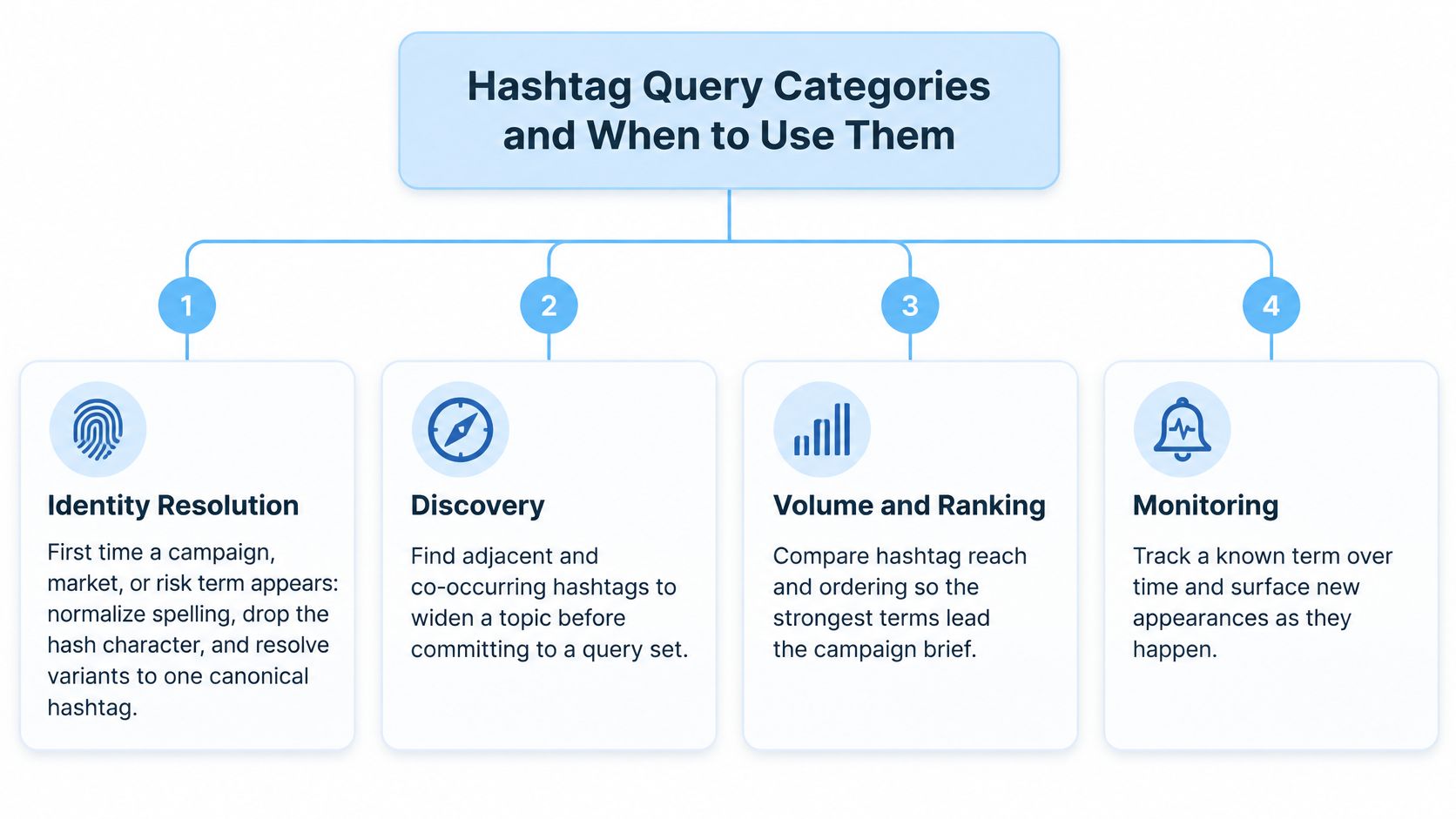
Identity resolution is for the first time a campaign, market, or risk term appears. Normalize spelling, drop the hash character, reject emoji, then store the IG Hashtag ID. For example, #BarCamp and barcamp pasted later by a partner. That is one canonical string, one ID, one slot. It is not two categories.
Top media is for influence and creative review. An influencer team wants the public posts Instagram is already ranking for a launch tag, so they can brief creators on what the ranked slice looks like this week. It is a ranked slice. It is the wrong tool for measuring how many people posted.
Recent media is for monitoring and user-generated content from the last day. A brand tag or an event tag checked on a schedule fits here. A quiet 24-hour window is not proof the tag is dead. It is proof that public photo and video in that window, after ads were excluded, came back empty or thin.
Recently searched hashtags is an inventory of the account's own quota. Run it before you add a language variant or a crisis term. The question is "is this string already occupying a slot," not "what are people posting."
A global brand with many languages multiplies terms faster than one account's allowance. #sale, #soldes, and #oferta are three slots if you let each spelling become its own category. Deduplicate synonyms and market spellings before they ever reach a category label.
A short walkthrough of how teams wire a search client is worth watching once the four jobs are clear, because the UI in a demo often hides which operation just ran.
The decision rule
- New string: identity resolution.
- "What is performing": top media.
- "What was posted today": recent media.
- "Can we add another tag this week": the recently searched list.
Discovery of neighboring tags, the compass job in the diagram, belongs in your own watchlist scoring, not in a fifth Graph call. Co-occurring spellings you have not resolved yet are candidates. They are not free queries.
Hashtag Response Fields You Should Store
Two payloads come back, and they should not be mashed into one object. The search payload is small. The media payload is where teams invent fields the edge never sent.
The search payload
Persist the IG Hashtag ID and the query string you sent. The ID is what later calls use. The original string is what you diff when someone swears they searched barcamp and the stored key was bar-camp. You will not get an author, a caption, or a like count from this response. If your mapper expects them, it is reading the wrong payload.
Media fields to request
For top_media and recent_media, request fields explicitly. A default set will drift, and a missing field looks like a zero.
id. Store this as the stable media identifier and the dedupe key. The misread is treating the shortcode inside a permalink as the id. They can point at the same post and still fail a join.
media_type. Store image, video, or carousel. The misread is assuming every video has a playable URL in this object. You have a type flag, not a guarantee of every rendition.
media_url. Store it when you need the asset reference the edge returned. The misread is caching it as a permanent file. These URLs expire, and a week-old row will 404 even though the post is still public.
permalink. Store the public URL. The misread is using it as a downloadable asset or as a unique key. It is a link a person can open.
caption. Store the text, and allow empty. Plenty of posts have no caption. The misread is dropping the row because caption is null, which deletes image-only posts from a UGC board.
timestamp. Store it as publish time. The misread is treating it as the time you fetched the page. Those two clocks answer different questions, and mixing them makes a "posted today" chart drift.
like_count and comments_count. Store them as point-in-time engagement, with collected_at beside them. The misread is calling them lifetime totals. A later poll of the same media id can show a higher count, and the earlier number was still correct when you stored it.
children. Present when media_type is a carousel. Store the child ids if you need the album structure. The misread is expecting each slide's URL in the parent object. Children need a follow-up read if you need each slide.
Comments themselves are not in this payload. A comments endpoint and a single-media endpoint exist for that follow-up. Their parameters belong with the call you make after the hit, not in the hashtag mapper.
A minimal stored record
Keep the row small enough that a partial page is still usable.
- Hashtag ID you queried.
- Media id, media_type, and permalink.
- Timestamp, like_count, comments_count, and collected_at.
Leave caption and media_url in an optional blob. Analytics that only need "did this post appear, and how large was engagement when we saw it" should not block on a missing caption.
Like counts without a collection time are a screenshot. With a collection time, they are a measurement.
Running a Hashtag Search Request
An empirical study of Instagram's early years found that fewer than 2% of posts were associated with hashtags in the fourth quarter of 2010, when Instagram launched, and that the proportion had risen to almost 70% by the fourth quarter of 2015. Over the same period, the share of users who had ever used a hashtag increased from 18% to 97%, according to that study of hashtag adoption. Manual browsing cannot cover a corpus that large. The official design splits the work into two stages, which is why a hashtag search API integration is a scheduler, not a single GET.
Meta's Instagram hashtag search guide exposes GET /ig_hashtag_search?user_id=<USER_ID>&q=<QUERY_STRING> to resolve a hashtag to an IG Hashtag ID. After that, the client requests top_media or recent_media. IDs are static and global, so an ID resolved in one app is the same ID for that spelling everywhere. Caching the mapping avoids repeat discovery calls. The cache does not make retrieval free. Each Instagram Business or Creator account may query at most 30 unique hashtags in a rolling seven-day period, and both the search call and the media-edge call count against that allowance. Repeating a hashtag inside the window does not consume another slot and does not reset its timer.
The request, one action at a time
Use barcamp as the concrete query. No hash character.
- Normalize. Remove a leading
#, trim spaces, and reject emoji. Emoji hashtags are unsupported, so they never reach the wire. - Look up the normalized string in the ID cache for this account.
- On a miss, call
GET /ig_hashtag_searchwithuser_idset to the Business or Creator id that owns the token andq=barcamp. - Persist the returned IG Hashtag ID with the account id and the first-query timestamp.
- Choose the edge.
top_mediafor ranked posts, orrecent_mediafor public photo and video from the last 24 hours. Build this URL from the ID, not from the original string. - Request the field list from the field guide, and set
limitonly if you need a page smaller than the default. On recent media, never setlimitabove 50. - Follow the cursor until it is empty or you hit your own cutoff. Cursor handling is its own contract, covered with page size and errors below.
- Store the media id, collection time, and queried window so a later poll can dedupe and so an empty page is labeled as a window, not as a dead tag.
What a generic error means
A query Meta classifies as sensitive or offensive can return a generic error. That is a policy result. Retrying it like a timeout burns time and teaches the client the wrong lesson, because the same string will fail again. Validate syntax first, then log the body as a policy failure and move to the next approved tag.
Persist the first-query timestamp on step 4 even when step 5 is delayed. The slot starts when you query the tag, and a media read later in the week is a repeat, not a new unique string, as long as you stay inside that window and on that account.
Pagination, Freshness, and Error Diagnosis
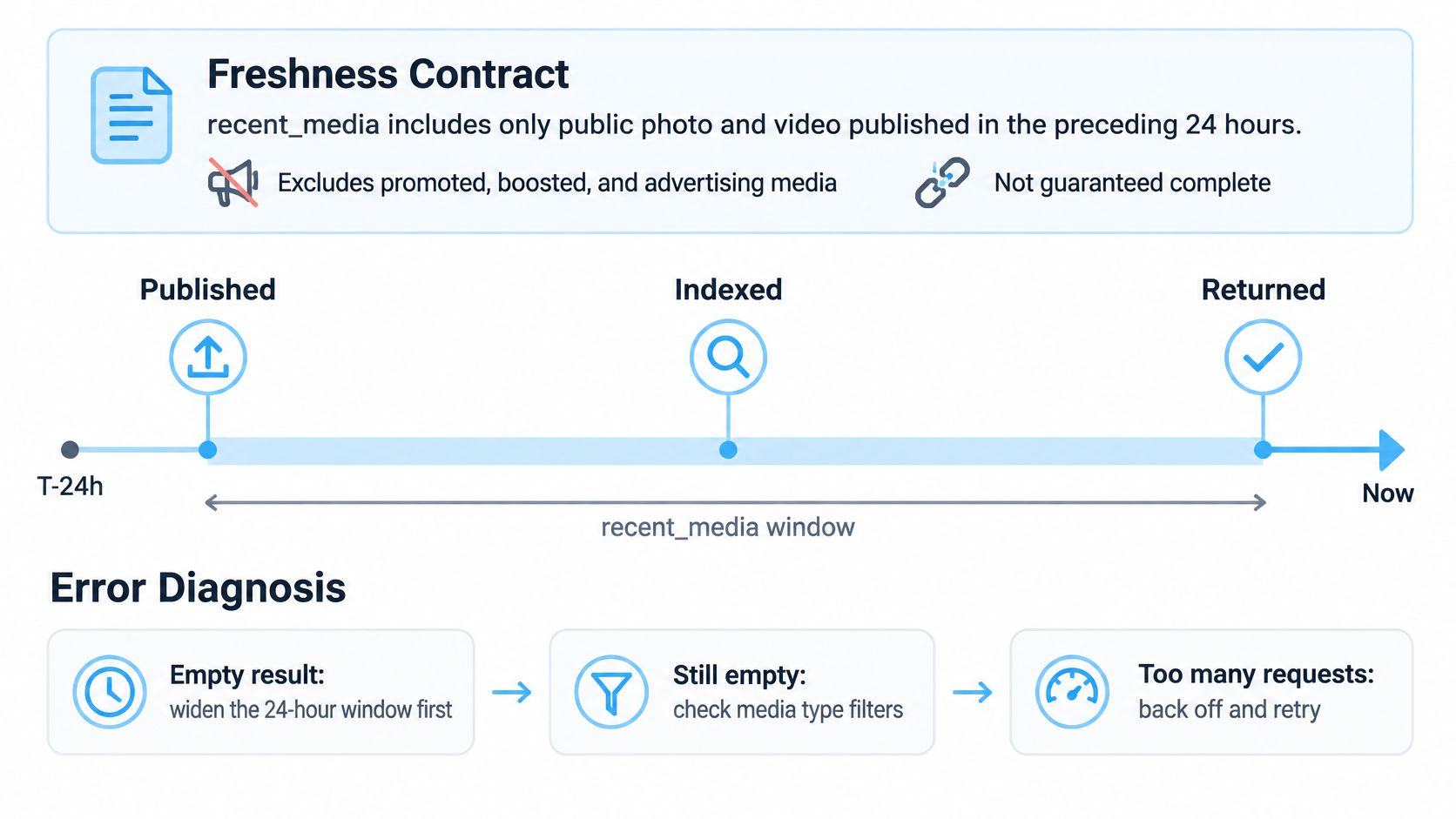
recent_media is a freshness contract, not a history API. The recent media reference returns only public photo and video published within the preceding 24 hours. It excludes promoted, boosted, and advertising media, and results are not guaranteed to be chronological. Stop on an empty cursor or on your own cutoff. Do not stop because a timestamp looks older than the previous item. Order is not a promise, so an older publish time can show up before a newer one on the same page.
Page size is per endpoint
Recent media allows a maximum limit of 50. Recently searched hashtags defaults to 25 and adjusts up to a maximum of 30. Hard-coding 50 for every path will break the inventory call. Hard-coding 25 for recent media is legal and merely slow, which is why the bug hides until someone copies the constant the other direction.
Top media has no 24-hour promise, and it is still not an archive. A short ranked list can be the entire successful response. Paginate it if a cursor is present, then stop. Do not loop hoping the next page becomes "everything posted this month."
Dedupe on media id. Overlapping polls repeat items, especially when you poll more than once inside the same day. Store collection time, cursor, and the hashtag window with the page so you can explain a thin result later.
Read the failure before you retry
| Symptom | Likely cause | What to do |
|---|---|---|
| Emoji or decorated tag rejected | Emoji hashtags are unsupported | Reject or strip emoji before the call; do not retry |
| Generic error on a normal-looking string | Query classed sensitive or offensive | Log as a policy failure, not a network timeout |
| Rate-limit response | Meta Platform Rate Limits, not Business Use Case limits | Exponential backoff and cap concurrency per app and user |
| New tags fail after a busy week | 30 unique hashtags in a rolling 7 days | Wait until the first-query timestamp plus 7 days; repeats of the same tag are free |
| Successful call, no media | 24-hour window, ads excluded, or cursor finished | Record a partial or empty scope; do not alert as zero audience |
Hashtag search sits under Meta Platform Rate Limits, not Instagram Business Use Case limits. A 429 is a pace problem. Back off exponentially and cap concurrency per app and user pair. A quota rejection on a new string is a calendar problem. Backoff will not open a slot.
The hashtag search documentation also makes the planning point easy to miss: media retrieval still counts against the allowance even when the application already has the hashtag ID. Multilingual campaigns and region-specific spellings multiply terms faster than that allowance scales. The workable pattern is prioritized, quota-aware sampling: a stable watchlist, scores by business value and expected volume, cached IDs, deduped synonyms, and a few slots held for an incident.
Partial-result metadata
Downstream charts should not treat a cut-short pull as zero activity. Write this next to every run.
- Pages fetched and the last cursor, or an explicit empty cursor.
- Stopped-because: cursor exhausted, item cap, or time cap.
collected_at, plus a flag that the body is partial when you stopped early.
That is the same discipline as service monitoring. If you already track metrics, logs and SLOs explained for your own APIs, hang the hashtag pull on that board: success, partial, policy failure, and rate limit as separate series. A social listening job that only stores posts will page an on-call engineer for an empty afternoon. A social listening API workflow that stores the stop reason will not.
Scheduling Hashtags Under the 30-Tag Quota
The miss teams make is architectural. They cache the ID and then assume media reads are unlimited. They are not. The ID lookup and the media reads consume the account's unique-tag slots, including when the ID was already in your cache. A repeat of a tag that is already in the window consumes no new slot and does not reset its timer. Persist the first-query timestamp, and schedule the next refresh only after seven days have passed for that account and that string.
Quota-aware sampling
Cache IDs and the last response so a dashboard can render yesterday's ranked slice without a new call. Reserve a few slots for an incident term you do not know yet. If the standing list already fills the window, you have no room when a product issue starts trending under a new phrase.
A watchlist longer than the allowance cannot be fully covered. Decide which tags are excluded and write that down. Letting the last ones fail at request time looks like an outage, and it trains people to retry, which does not help.
If your goal is a contact list rather than public posts, an official media edge will not hand you emails. Teams that compare which hashtag scrapers export usable contacts are solving a different job from this quota plan, and mixing the two in one worker is how a monitoring slot gets spent on a lead-export experiment.
What operators should log
Log one line per attempt, not one line per media item.
- Request outcome (ok, partial, policy, rate limit, quota).
- Hashtag, account id, and first-query time.
- Slots assumed used after the call, so a busy week is visible as a quota event.
- Whether the body is partial, so analytics do not read a cutoff as "nothing posted."
A week that shows thirty new strings and a pile of quota failures is a planning bug. A week that shows the same thirty strings refreshed as repeats is a healthy schedule.
Choose the Next Call After the Hashtag Hit
A hashtag result gives you several possible next calls, each tied to a different identifier. Use a media ID or permalink to retrieve a single post, then request its comments if you need the discussion. Use an author username for a profile lookup. A place name in a caption calls for location search, not another hashtag search.
Two routes for the public read
| Route | Best fit | Setup and access |
|---|---|---|
| Instagram Graph API | Apps with a reviewed Business or Creator token and a watchlist within 30 unique tags per account per week | Facebook Login, app review, business verification |
| Instagram API at profilequery.com | Teams that need public top and recent hashtag posts and prefer API-key access | API key and prepaid credits |
| Quota model | 30 unique tags per account per rolling 7 days on the Graph route | Prepaid credits; the top hashtag posts request costs 1 credit |
Choose the Graph API when your app already has a reviewed Business or Creator token and the watchlist fits its 30-unique-tag rolling seven-day allowance. Keep each query tied to the same account so you can track which account used each tag.
For public top-ranked posts, recent posts, and hashtag analysis without OAuth or app-review setup, Instagram API at profilequery.com offers API-key access with prepaid credits. Its top hashtag posts endpoint returns Instagram's ranked posts and costs 1 credit per request. Provide the required tag without the # symbol. The Analyze hashtag endpoint provides competitiveness and velocity. When a result gives you a post or username to investigate, use the Instagram posts API for deeper post, comment, and profile reads.
Store the tag, the response, and the identifier needed for the next call. On the Graph route, record the first-query time against the account that used the tag, then schedule refreshes within the rolling allowance. On the API-key route, track prepaid-credit use separately from the Graph API's unique-tag quota. The two routes have different access and billing models; neither changes what the other route permits.
Pull Instagram data with one API call
Profiles, posts, reels, followers and more. 50 free credits, no credit card.
Get your free key