
Followers List: What It Holds and How to Fetch It
See what an Instagram followers list contains, why pages often stop near 50 rows, and how to store a partial snapshot without treating the count as proof.
Popular advice says to download a followers list, count the rows, and treat the result as an audience. That shortcut confuses three different things: the number shown on a profile, the records a retrieval method makes available, and the history of who followed whom. For a developer, a followers list is best treated as a timestamped sample of relationship records, not automatically a complete or historical graph.
That distinction matters whether you're building an integration, evaluating a creator, or checking an account. A useful pipeline defines each field, records when it collected the data, and labels incomplete results clearly. A bigger displayed count doesn't make one export more informative.
Table of Contents
- What an Instagram Followers List Contains
- Categories of Accounts Inside the List
- Ways to Retrieve a Followers List
- Export Your Own Followers List Step by Step
- How Cursor Pagination Works in Practice
- Related Objects and Where to Read Them
- Snapshots, Retention and Privacy Rules
- Quality Checks a Raw List Cannot Settle
- Quick Lookup and Your First Public Pull
What an Instagram Followers List Contains
| Field | Usually present | Safe use |
|---|---|---|
| Numeric account ID | Yes | Stable key for deduplication |
| Username | Yes | Display only, because it can change |
| Full name | Often | Display label, not identity proof |
| Verified badge | Often | Badge status at retrieval time |
| Private flag | Often | Expect fewer visible fields |
| Profile picture URL | Often | Display, and expect URL expiry |
| Follow or unfollow timestamp | No | Do not invent a date |
| List position | Yes, but meaningless as time | Do not treat as recency |
A followers list is the set of accounts recorded as following a named Instagram account at the moment of retrieval. Each row represents a relationship from one account to the target. It isn't the target's following list, which represents accounts the target follows, and it isn't the profile's aggregate follower count.
Read the table from left to right as a data dictionary. The numeric account ID is the strongest row key when the source provides it, because usernames can change. A username is useful for display and lookup, but it shouldn't be the primary key for long-term comparisons. Full name, badge status, privacy status, and picture URL can help render or filter a row, but none establishes that a person is the account owner you think it is.
The fields missing from the row are just as important. A typical result doesn't establish a follow date or unfollow date, and it doesn't provide a reliable country, email address, or trustworthy chronology. A list position may be present, but Instagram's displayed order can be personalized. Don't convert “row 20” into “followed more recently than row 60.”
Keep the three counts separate
Teams often use “follower count” to mean three distinct values:
- Displayed follower count: the aggregate number shown on a profile.
- Rows returned: the follower records in a particular response or export.
- Distinct IDs across snapshots: the unique account IDs observed across one or more saved collections.
Those values can differ sharply. A profile may display 100,000 followers while a retrieval returns only a few dozen rows. The row count describes what you received, not the full audience and not the profile's total.
Start your schema with the fields the retrieval supplies. Add explicit nullable fields for data you might want but cannot establish, such as followed_at and unfollowed_at. Store those as unknown, not as zero or an invented date. A missing timestamp is a missing fact, not an event that happened at a particular time.
Categories of Accounts Inside the List
A pipeline can classify rows by observable fields without guessing why an account follows the target. The practical distinction is between a row's retrieval status and any interpretation an analyst might later make about its quality.
| Primary category | Fields that support it | Mistake it prevents |
|---|---|---|
| Public | Visible username and account ID | Treating an ordinary visible row as a risk finding |
| Private | Private flag, with limited profile fields | Assuming missing details mean a broken record |
| Unresolved | Earlier ID no longer resolves, or identity details are unavailable | Deleting an earlier relationship because a later lookup fails |
A public row with a visible username and numeric ID is generally usable for the task of storing an observed relationship. Keep the retrieval time with it. “Usable” doesn't mean verified, authentic, or relevant; it only means the row contains enough information for the defined operation.
A private account may still appear in a returned collection with a username and privacy flag, but offer little else. Preserve what the source returned rather than filling gaps with guesses. Likewise, a verified badge is an overlay, not a quality rating and not proof that the account is a genuine fan of the target.
Keep review signals separate
Thin profiles, accounts with no visible posts, and unusually high follower-to-following ratios belong in a review bucket, not an automatic fraud category. Each can be a reason to investigate, but none proves motive or deception. Store these as secondary flags so a private, verified account doesn't have to be forced into one misleading primary category.
If an ID that appeared in an earlier snapshot later fails to resolve, mark it unresolved and keep the earlier record. It may have been renamed, deactivated, or become inaccessible. A lookup failure alone doesn't establish that the relationship ended.
The target's business or creator category belongs on the target profile, not on every follower row. Keeping target-level attributes out of follower records avoids duplicating information and confusing the account being analyzed with the accounts connected to it.
A compact enum can be: public, private, verified_overlay, thin_profile_review, unresolved.
Ways to Retrieve a Followers List
| Path | Whose data | Typical result | Fits this job |
|---|---|---|---|
| Owner data export | The requesting account only | Owner archive in the offered export format | Archive of your own account |
| In-app followers sheet | Whatever the viewer is allowed to see | Viewer-specific ordering and partial coverage | One-off manual check |
| Official profile API | Consented messaging context | Follower count and relationship flags | Apps the user authorized |
| Public followers endpoint | A public target account | One page of accounts plus next_cursor when more exist | Labeled partial monitoring |
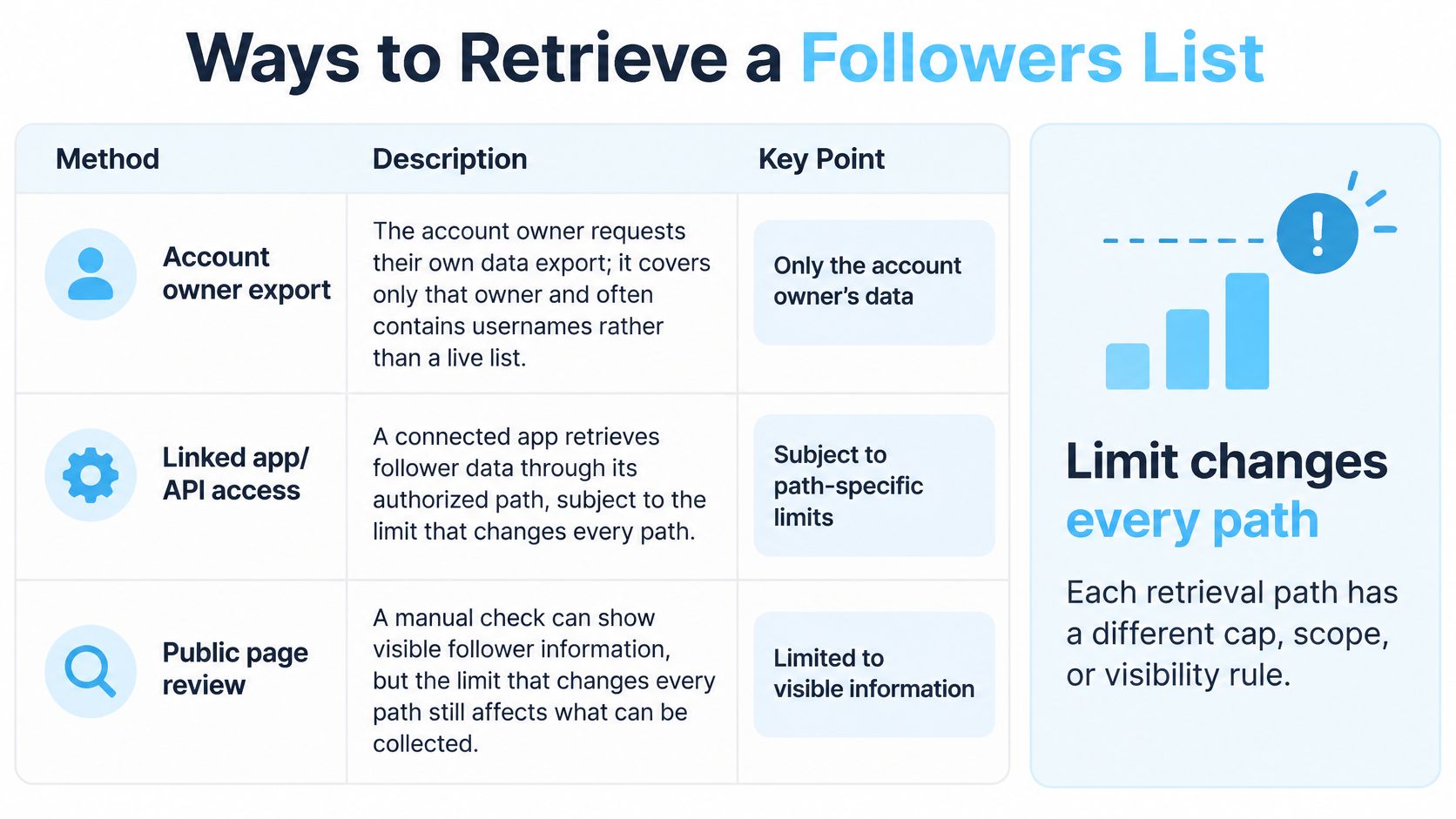
Each path has its own scope and visibility rules. An owner export covers the requesting account's archive. A manual sheet shows what Instagram renders to that viewer, which can shift with ranking, privacy, and login state. An official profile API serves apps the user authorized inside a documented messaging context: Meta's Instagram User Profile API documentation describes follower count and relationship indicators in that context.
A public followers endpoint works more like a cursor-fed ledger than a finished graph. In the Instagram API, Get followers returns one page of accounts that follow the target; list endpoints return up to one page plus a next_cursor, and passing that value back as the cursor asks for the next page. A continuation cursor means more rows may exist. It does not add follow dates, prove complete coverage, or preserve edges that later changed.
If a profile displays a large audience and your pull contains only the rows returned before the cursors stop, treat the displayed count as context and the saved rows as the evidence. A bigger denominator does not supply missing usernames, timestamps, or history. Record the target, pull time, cursor values, and page metadata, then mark the result partial when paging ends early or coverage is unknown.
For a plain-language explanation of what a person can see in the app, consult this guide to view followers on an Instagram profile. For a programmatic workflow, an Instagram scraper API exposes a followers endpoint for inbound accounts and a separate following endpoint for outbound relationships.
Choose by job: owner export for your own archive, authorized API path for a consented relationship, manual view for a quick check, or a labeled public sample for monitoring. Keep each in its own lane so an archive, a screen view, and a cursor sample are never compared as if they were the same object.
Export Your Own Followers List Step by Step
An owner export is useful when you need an archive of the account you control. It isn't a shortcut for collecting another creator's followers, and it shouldn't be treated as a live graph that updates as relationships change.
Open the account's information settings. In the Instagram app, find the option to download or request your information. Choose the connection or follower data category if it is offered for the account and export type.
Select a machine-readable format. Choose JSON when available and appropriate for your workflow. A structured file is easier to parse consistently than a page designed for reading by a person.
Submit the request and wait for the file. Owner exports can take hours or days, so don't build a scheduled ingestion pipeline that assumes an immediate response. Record when you made the request separately from when you downloaded the result.
Inspect the actual fields before loading the file. Expect usernames and profile links rather than follow timestamps. Don't treat row order as a timeline, and don't create dates to fill missing columns.
Load it as an owner-archive snapshot. Record the requesting account, request time, download time, and source file. If the export includes numeric account IDs, use them as the row key. If it doesn't, use the available username and note that it can change.
Keep it separate from public-profile pulls. An owner archive and a public-data sample have different access paths and completeness assumptions. Store them with different provenance labels so a downstream report doesn't mistake one for the other.
An export can contribute to a history only when you compare separate captures. If you repeat the request on a schedule, diff the files by ID where possible and record changes as observed between the two capture dates. That comparison can identify an account present in one file and absent from another; it still can't establish the exact time a follow or unfollow occurred.
How Cursor Pagination Works in Practice
A followers endpoint returns one bounded page at a time: a slice of the account's current relationship edges, plus a pointer to where the next slice begins. That pointer matters as much as the rows, because a long crawl assembles a timestamped sample gathered while the list kept changing. The pagination guidance for large-result collections describes optional cursors, continuation relations such as next, and the need to process pages consistently.
Build the client loop
Request the first page without a cursor. Identify the target by username, numeric ID, or profile URL, and store the identifier you used so an ambiguous name cannot become the only record of which account was queried.
Read the follower objects and the response metadata together. A response carries a
next_cursorfor continuation and a request ID; documented metadata also covers credits charged, remaining balance, and processing time. Store that metadata in the same durable table as the page's rows.Persist the cursor with a start time. The cursor marks where the crawl stopped, and the start time defines the sample. A restarted job needs both.
Pass the saved value back as the
cursorquery parameter. The API's list endpoints return up to one page of items plus anext_cursor, and echoing it back requests the next page. Send the cursor exactly as received rather than reconstructing it from row positions.Upsert idempotently, keyed on account ID. A retry that returns an already stored row should update it, never duplicate it. Usernames can change between pages, so use the numeric account ID as the key when it is available.
Stop when the response omits the cursor. No cursor means the sample ended, even when the row total sits far below the profile's displayed follower count. A bigger displayed count never makes an export more complete; it only raises the ceiling on what a full crawl might contain.
Cursors belong to one collection each
Followers and following are separate collections with separate cursors. A cursor saved mid-crawl on one list has no meaning on the other, so tag each stored cursor with the endpoint that issued it. The same rule applies when a service returns HTTP Link headers with next and prev relations instead of a body field: persist whichever continuation form arrives, along with its retrieval context.
Page boundaries can move while you crawl. Someone may follow or unfollow the account between your first request and your last, which is why rows get deduplicated by ID and the whole pull gets labeled by its start time. Keep the stored schema narrow: account ID, username, display name, profile URL, badge status when available, timestamp, and the source cursor. Anything beyond what the workflow consumes is storage without benefit.
Related Objects and Where to Read Them
The wrong endpoint can return useful data that answers the wrong question. Route the request by the object you want, then keep its records separate from follower relationships.
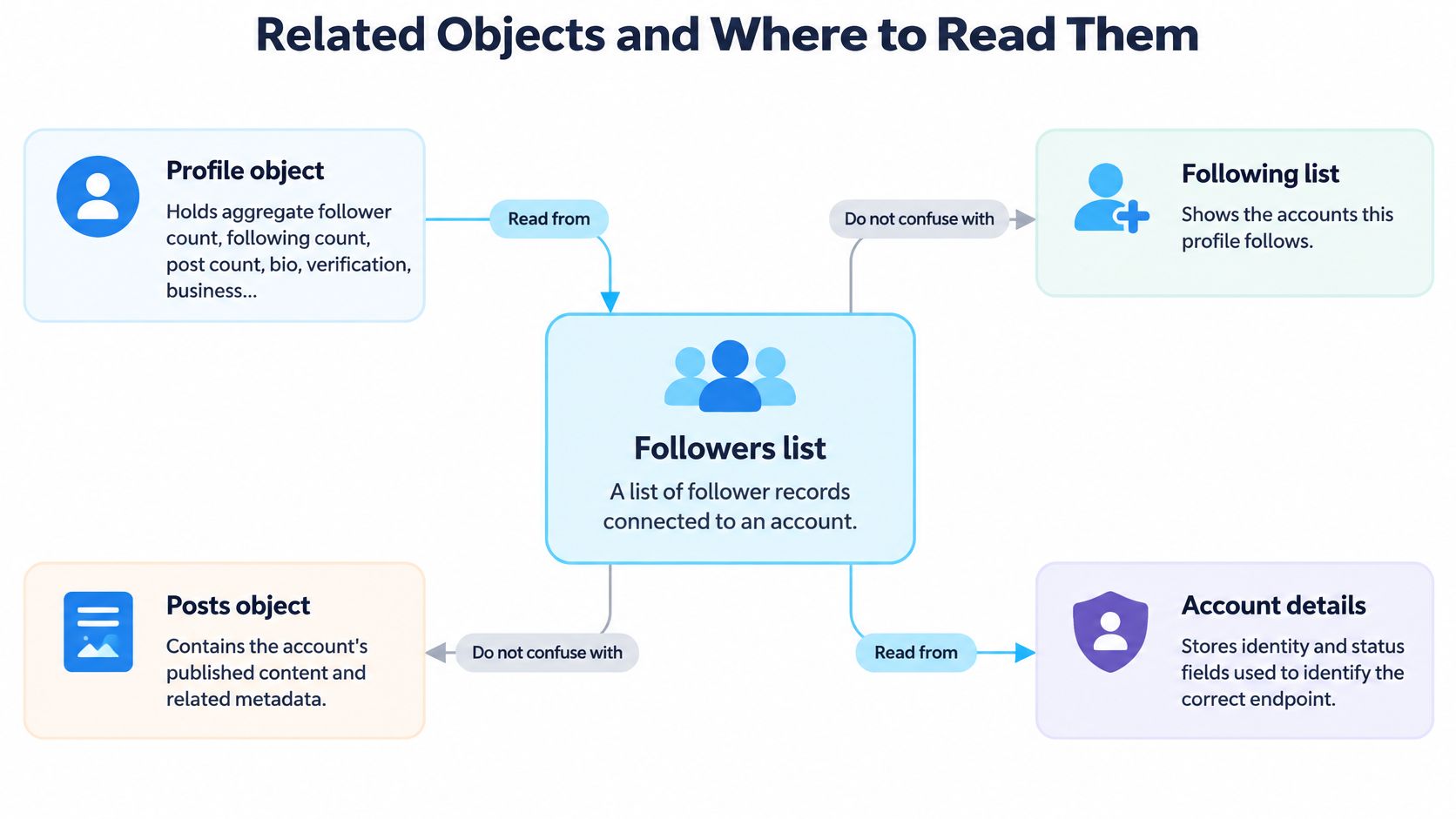
Profile object: The profile carries aggregate follower and following counts, post count, bio, verification and business flags, external URL, and picture URL. It describes the target account; it doesn't contain the member rows. The profile object documentation helps distinguish profile attributes from list records.
Following list: This is the outbound edge: the accounts the target follows. It has its own collection and cursor, so don't use it as a substitute for the followers list.
Posts, reels, stories, and highlights: These objects describe content the account published and related metadata, such as reel view counts. They don't identify everyone who follows the publisher.
Comments and likers: These are engagement records attached to a particular media object. A liker or commenter is not automatically a follower, so don't merge these records with a followers sample.
Hashtag and location results: These can return authors of content, including identifying profile fields. They're discovery results, not a list of those authors' followers.
Similar-account results: These rank lookalike accounts rather than members of the target's relationship graph.
Account details and calculated insights: Account age, creation month and year, previous usernames, and registration country describe the target account. Registration country isn't current residence. Engagement rate, best time to post, and niche labels are calculated insights, not follower-row fields.
If the question is who follows this account, stay on the followers collection and its cursor.
Snapshots, Retention and Privacy Rules
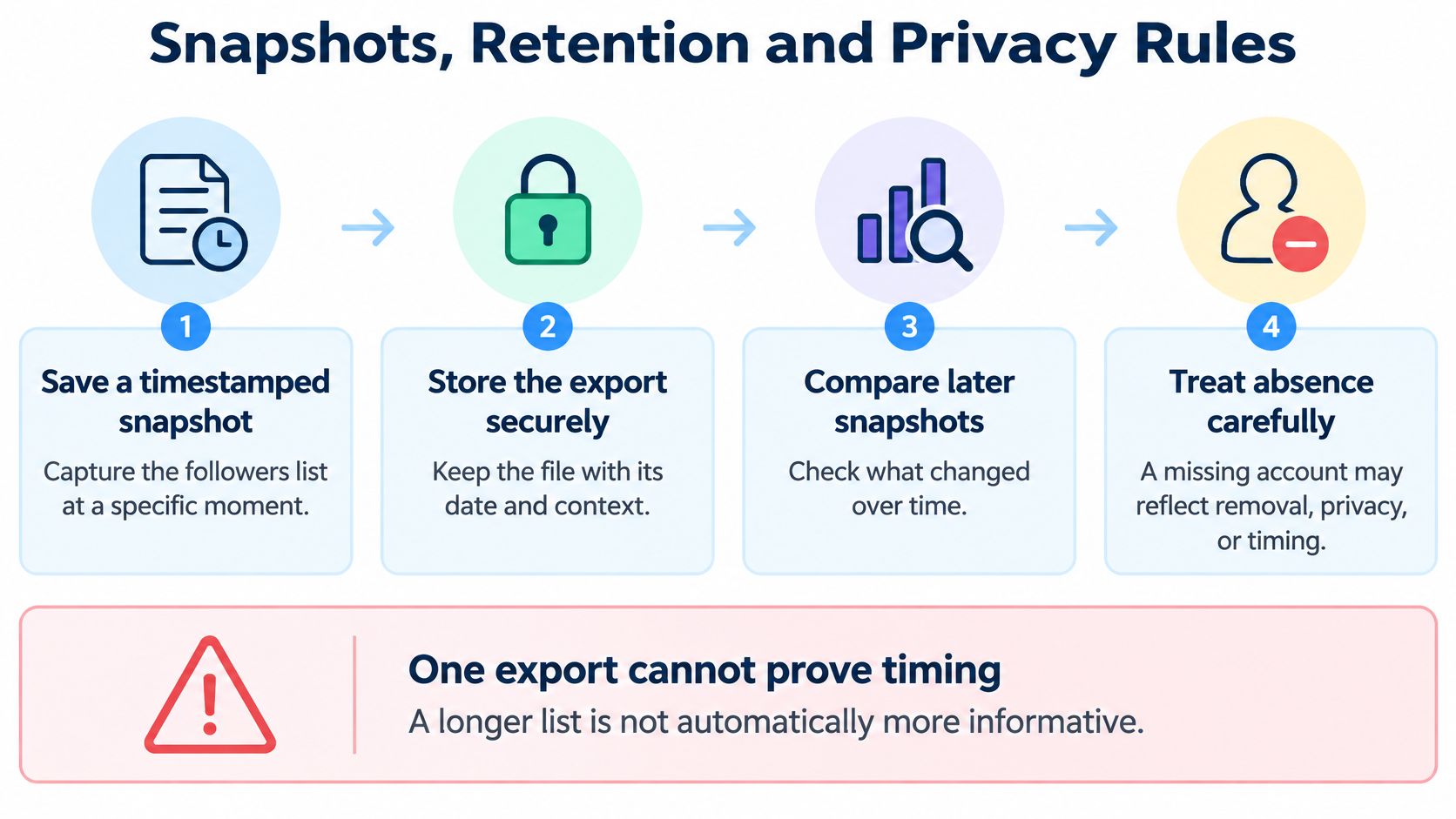
A followers list works like a photograph of a moving crowd: it records relationship edges visible at capture time, not the whole history of how the crowd formed. One export cannot prove when a relationship began, whether an account was removed recently, or why a row disappeared. A larger displayed follower count does not make an export more informative either, particularly when the file lacks stable IDs or follow timestamps. A guide to Instagram follower exports also notes that exports generally lack follow dates, may take hours or days, and that visible list order is not a reliable chronology.
Use repeatable snapshots instead:
- Save a timestamped capture. Store the collection time, source, target ID, retrieval path, and cursor position with the rows.
- Normalize and key records. Normalize usernames for comparison, but use numeric IDs as keys when available because usernames can change.
- Compare later captures. Mark IDs observed in one snapshot but not the next as additions or absences between those captures, not as events with exact times.
- Classify unresolved cases. Separate inaccessible, private, and deactivated accounts from confirmed relationship changes.
- Keep the claim narrow. Never label a missing ID with an unfollow timestamp that the data does not contain.
A single list cannot settle who unfollowed someone, and public visibility does not grant unrestricted bulk access to another person's full list. Access stays permission- and context-dependent, so scope each pull to the question, the account, and the authorization you have.
Treat each row as personal-data-derived, even when the profile is public. Keep provenance, collection time, and observed facts separate from calculated scores, and label partial pages as partial rather than complete coverage. Use least-privilege fields, encryption in transit and at rest, tenant isolation, audit logs, and a documented retention period. Hash or pseudonymize identifiers when exact identity is not needed, and support suppression and deletion of both the row and derived values. For general retention-schedule discipline outside follower data, this discussion of legal obligations for retaining customer messages is a useful reminder to document what is kept, why, and for how long.
Quality Checks a Raw List Cannot Settle
A raw list can show which account records were returned. It can't tell you by itself how many followers are reachable, authentic, relevant, or safe to use in a business decision. The incentive to assess quality is material: Shopify reports that one in four influencers has bought fake followers, estimates 9.5% of Instagram accounts are bots, and projects influencer-marketing spending at $9.29 billion in 2025, up 14.2% from 2024 (Shopify's influencer-marketing statistics).
Review observable signals, but don't turn any one signal into a verdict. Suspicious username patterns, unusual follower-to-following ratios, empty or newly created profiles, geographic mismatch, abrupt acquisition spikes, and repeated engagement from the same accounts can warrant further review. A single pattern doesn't prove fraud. Privacy settings can hide information, inactive users may still be legitimate, language differences can affect engagement, and niche communities can look unusual beside a broad audience.
Separate the labels
Keep three interpretations distinct in reporting:
- Purchased-looking: The account or pattern raises a concern, but the label is not proof of a purchase.
- Inactive: The profile or observed behavior suggests limited activity. Inactivity doesn't establish that an account is a bot.
- Relevant: The account appears to match the campaign or prospect criteria. Relevance still doesn't prove reach or conversion.
Then pair the sample with outcome measures that a name list doesn't contain: comments, saves, shares, audience location, and conversion quality. These measures answer different questions. A list may help you inspect visible account-level signals, while campaign outcomes show whether an audience responds to the content or offer.
Be especially cautious with a fake-follower estimate based on a capped sample. It describes the sample and method, not a verified count of all suspicious accounts in the full audience. The Instagram API includes a fake-follower audit endpoint that estimates real versus suspicious followers from a sample, and teams can use a tool such as the Instagram fake-follower checker API as one input to a broader review.
Practical rule: Report the evidence and the uncertainty separately. Don't collapse purchased-looking, inactive, and genuinely relevant accounts into one bot percentage.
Quick Lookup and Your First Public Pull
| Question | Safe answer | Do this |
|---|---|---|
| What is the stable key | Numeric account ID | Deduplicate on ID, not username |
| Does the profile count equal rows | No | Store both figures separately |
| How big is one page | About 25 followers | Request the next cursor |
| When does a pull stop | Often near 50 rows | Label the sample partial |
| Is there a follow date | No | Leave the timestamp unknown |
| Does order mean recency | No, order is personalized | Do not sort by position |
| What is a missing ID later | An absence since the last snapshot | Do not invent an unfollow date |
Use the table to make the first call deliberately: identify one public account, request one followers page, store its ID and retrieval time, and mark the capture as a partial snapshot rather than waiting for the displayed total. Instagram API provides separate Get followers and Get following endpoints, so use the followers collection for inbound relationships and the following collection for outbound ones; its list endpoints return a page and continuation cursor when another page is available. If your next question is audience credibility, a fake-follower audit estimates real versus suspicious accounts from a sample, so label its result as an estimate rather than a complete count.
Instagram API offers structured JSON endpoints for public profile data, followers, following, posts, reels, and related analytics. If you're building a workflow around a followers list, visit Instagram API to explore the endpoints and choose the collection that matches your question.
Pull Instagram data with one API call
Profiles, posts, reels, followers and more. 50 free credits, no credit card.
Get your free key