
API in Marketing: How Teams Use APIs to Track Data
Learn how API in Marketing powers analytics, audience research, monitoring and automation, with the data-quality risks to check first.
You're copying follower counts into a spreadsheet on Monday, checking five creator profiles by hand, then finding the numbers have changed by the time you present them on Friday. Someone on your team suggests using an API in marketing to pull the data automatically, and that sounds like relief. It can be, but only if you understand what changes and what doesn't.
An API doesn't fix a weak question or a messy spreadsheet. It delivers data faster, in a fixed format, at a scale where one labeling mistake can fill your CRM, dashboard, and AI summaries before anyone notices. That's why reliable API work is a data-governance problem first and a connectivity problem second.
Table of Contents
- Marketing Workflows an API Connects
- How an API Moves Data Into Marketing Tools
- Using API Data for Creator and Audience Research
- Brand Monitoring and Automation Through APIs
- Keeping API Data Reliable Over Time
- Access Routes, Controls and Setup Choice
Marketing Workflows an API Connects
| Workflow | Data the API returns | Typical output | Main risk |
|---|---|---|---|
| Campaign analytics | Post metrics, engagement rate, posting cadence | Weekly performance dashboard | Comparing posts pulled in different windows |
| Audience and creator research | Profile fields, follower and engagement data, account history | Shortlist with risk flags | Treating inferred scores as fact |
| Brand monitoring | Mentions, hashtag and location posts, comments | Daily digest or alert | Reading missing results as zero activity |
| Customer-generated content | Posts, reels, location posts | Rights-tracked asset library | Consent and usage gaps |
| Lead enrichment | Profile details, lead-fit scores | Enriched CRM fields | Stale or misattributed records |
| AI agent automation | Normalized JSON via REST or tool interfaces | Summaries and routed tasks | Unvalidated output driving decisions |
Find the row closest to the manual task you're doing today, then read its risk column before you connect anything. That row tells you what you'll gain and what you must control from day one.
What the Table Is Really Showing
Notice that no row produces a finished decision. An API returns post metrics, profile fields, comments, or scores. Your team still decides what counts as strong engagement, which creator fits a brief, whether a mention needs a reply, and whether a customer post can be reused in an ad.
That distinction matters because teams often buy access expecting judgment. They get volume instead. A shortlist with risk flags is useful only if someone defines the flags, checks borderline cases, and knows which signals are estimates. A daily digest helps only if missing results trigger a question rather than a false sense of calm.
The API does not change the goal, it changes how fast data arrives and how much a single error costs.
Start small for that reason. Pick one workflow, define its output in plain language, and decide who reviews it before it reaches a client, a creator, or a customer. If you're evaluating tools that let you plug Instagram data into other apps, you can connect your apps to FoPost as one example of how teams link a data source to downstream tools, but the review logic still sits with you.
Don't automate six rows at once. Prove that one pull is accurate, timestamped, and understood by the people using it. Then add the next workflow with its own risk check, rather than copying the first setup and assuming it'll fit.
How an API Moves Data Into Marketing Tools
Think of an API like a restaurant counter. Your marketing tool places an order, the counter passes it to the kitchen, and the kitchen sends back a dish in a fixed format. You don't enter the kitchen, and you don't need to know how the provider fetched the data, but your order has to be specific.
The diagram below shows that counter, kitchen, and return path in four simple steps.
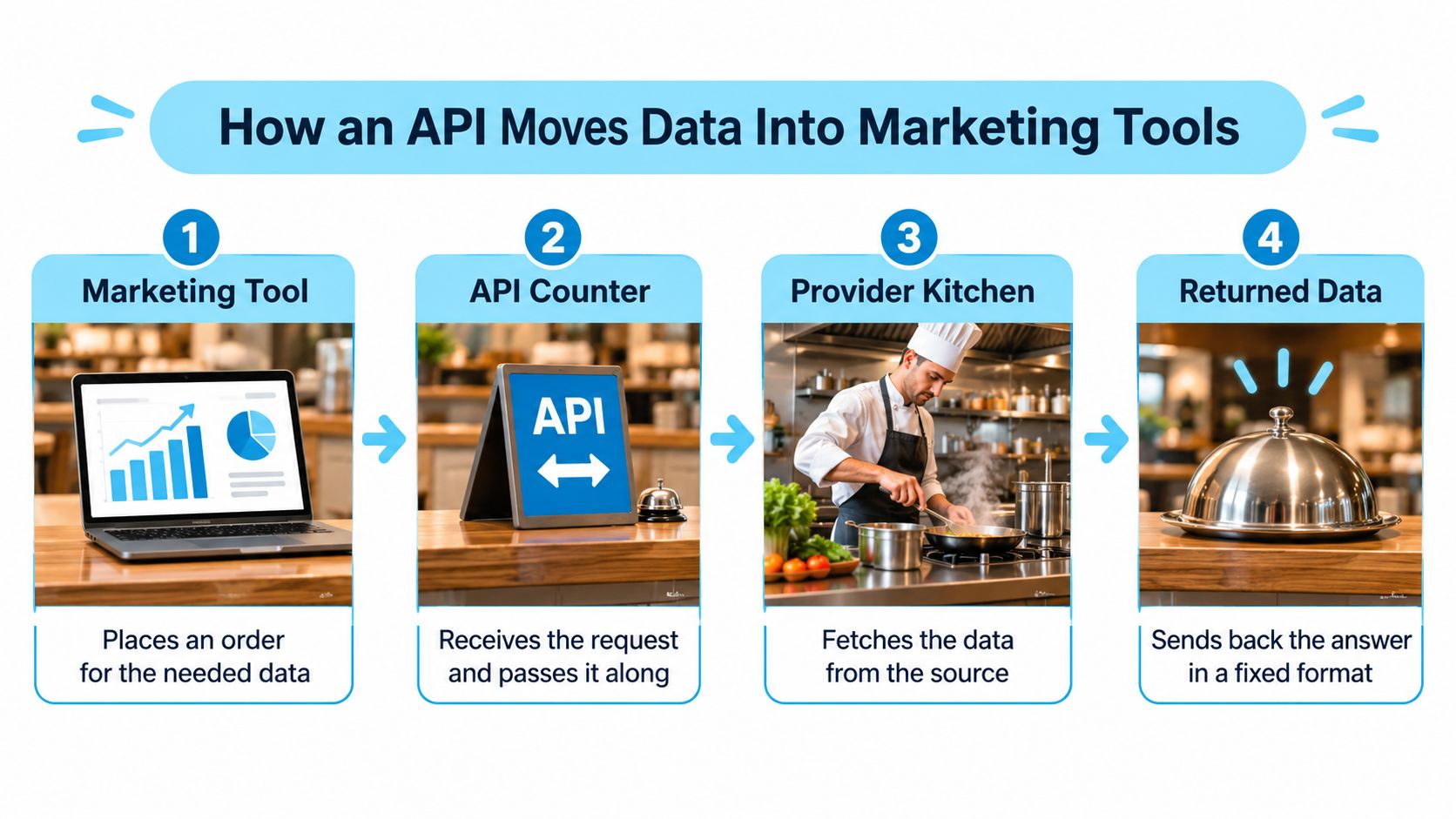
Here's the path a typical Instagram profile request follows.
- The tool sends a request. It names the account by username, numeric identifier, or profile URL, and specifies the endpoint it wants, such as profile details or recent posts.
- The service checks access. It validates the API key or token and the permissions attached to it before doing any work.
- The provider returns structured JSON. Fields such as follower count, post count, media type, and timestamps arrive with consistent names every time.
- Your application stores the response. Save each result with a retrieval timestamp and request identifier, not just the headline numbers.
- Your tools read the stored fields. A dashboard, spreadsheet, CRM, or warehouse uses those fields to build reports. Teams that need a warehouse route often follow a pattern like loading Instagram data into BigQuery so analysts can query history instead of overwriting it.
Single Pulls and Scheduled Pulls
A single endpoint returns one kind of data from one fixed address. You ask for a profile, you get a profile. A scheduled pull repeats that request on a cadence you choose, such as every morning, so trends build over time.
Consistent field names are what make repetition valuable. If follower count is always labeled the same way, one report can combine many accounts without custom parsing for each one. Response metadata also matters. Processing time, credits charged, and typed errors give you an audit trail when a run looks incomplete or costs more than expected.
This isn't a niche engineering habit. A worldwide survey of 1,770 senior business and IT executives found that 88% of enterprises were using APIs, with 40% using them for data and system integration. That helps explain why marketing stacks now assume data can move between CRM, analytics, advertising, and automation tools without manual exports.
Practical rule: When a number looks wrong, first identify which step produced it before you blame the source or change the report.
Using API Data for Creator and Audience Research
A creator with 80,000 followers and steady comment threads will usually outperform one with 800,000 followers whose last giveaway doubled the audience overnight. Follower count is the easiest number to collect and the weakest reason to sign a contract. The faster your pipeline pulls profiles, the faster that weak number reaches a decision, so the fields you choose to store matter more than the volume you collect.
The photo below captures the shift your team needs to make, from surface counts to a deeper assessment of fit and risk.

Research supports that deeper view. An academic study on influencer authenticity shows that uniqueness and consistency increase perceived authenticity, which in turn affects brand authenticity, brand attitude, and purchase intention.
Your API workflow can operationalize that idea if you join profile metadata, recent-post performance, posting-time patterns, comment signals, follower-quality checks, and account history into one time-windowed view. Time-windowed is the operative phrase: a 90-day window on posts and stories keeps a stale viral spike from inflating a current assessment, and labeling every field with its pull date means a stale row gets caught instead of silently steering a budget. Teams building that view often start from an Instagram analytics API pattern, then derive their own comparisons rather than accepting a single score.
| Metric | What it reveals | Caution |
|---|---|---|
| Median engagement per post | Typical performance | Compare only within the same niche and audience size |
| Engagement volatility | Consistency across recent posts | Unstable with few recent posts |
| Comment-to-like ratio | Depth of conversation | Giveaways inflate comment counts |
| Audience-growth anomalies | Sudden follower spikes | Campaigns or paid growth can explain them |
| Share of low-quality interactions | Authenticity signal | Model estimate, not proof |
| Account age and prior usernames | Due-diligence context | Risk signal only |
Why Medians Beat Averages Here
Say nine posts earn modest engagement and one post goes viral. The average jumps sharply, while the median engagement per post stays near the creator's usual output, so the median gives you a fairer estimate of what a paid post is likely to do.
Score creators against peers in the same niche and audience size, not against your whole database. A food creator and a finance creator have different comment habits, posting formats, and audience expectations. Two governance habits keep this honest. Label each metric with the window it was computed over, so nobody compares a 30-day median against a one-year one. Treat every row in the caution column as a decision limit, not a footnote: a model estimate of low-quality interactions can flag a candidate for review, and that is where its authority ends. Flag high-risk or high-value candidates and check them manually before contracting.
The short video below is useful background when your team is deciding how to present these deeper creator measures to stakeholders.
Keep one limit front and center. Registration country is not current residence. It can prompt a useful question during due diligence, but it never settles where a creator lives now or where their audience sits.
Brand Monitoring and Automation Through APIs
Brand monitoring works when it becomes a routine, not a scramble after someone screenshots a complaint. Your goal is a repeatable daily habit that captures mentions, records what was searched, and routes only the right items to a human.
A Morning Routine That Holds Up
Run hashtag and location searches each morning for your brand terms, product names, campaign tags, stores, venues, and events. Then pull comments on posts above an engagement threshold you set in advance, because high-reach criticism needs faster review than a quiet mention. Log every result with its query, time, and result count.
A sample cadence keeps this manageable.
- Daily pulls: Check brand terms, campaign hashtags, and priority locations.
- Weekly pulls: Refresh creator lists, competitor profiles, and customer-generated content candidates.
- Immediate checks: Investigate posts that mention a product problem, safety concern, or service failure.
Teams implementing the search side often use an Instagram hashtag API pattern to retrieve top and recent posts for a tag. Whatever route you choose, search results only include what the endpoint returns. If you don't record the query and count, you can't tell a quiet day from an incomplete pull.
Where Automation Helps and Where It Must Stop
Three patterns save real time. First, route alerts into a team channel or CRM so the right owner sees them quickly. Second, use AI tools to summarize profiles and posts so reviewers start with context. Third, call endpoints through tool interfaces so an assistant can answer plain-language questions, such as which tagged posts mentioned a launch this week.
Each pattern needs a human review point. Don't let automation trigger customer contact, a payment, a refund, or a public response without approval. Summaries can miss sarcasm, misread an image, or treat an inferred label as a fact about a person.
Automate gathering and sorting. Keep people in charge of promises, payments, and public replies.
Before launch, write down three decisions. Decide what triggers an alert, who reviews it, and how many requests each cycle uses against your budget. If you can't answer those three in one sentence each, you're not ready to turn the schedule on.
Keeping API Data Reliable Over Time
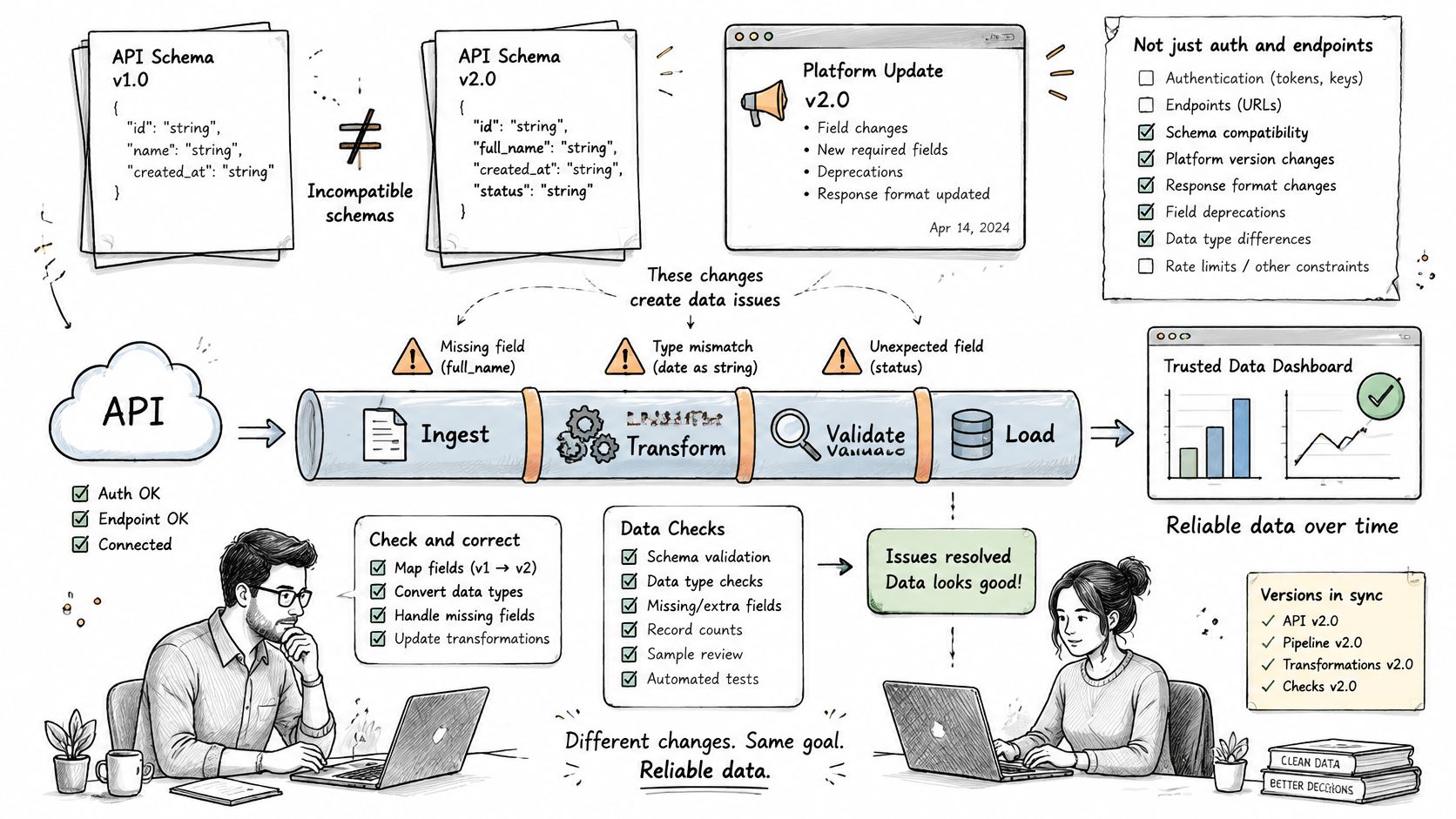
Most API guides stop at authentication, endpoints, and a dashboard screenshot. Your problems start after that, when a field changes, a creator renames an account, a pull fails without notice, or two systems disagree about the same person.
That gap is common. According to NetSuite's marketing data integration guidance, 65.7% of marketing professionals identify data integration as their biggest martech-management challenge, while data quality and accuracy rank as the leading challenge for 63% of brand and agency respondents. Faster collection doesn't solve those problems. It can amplify inaccurate, stale, duplicated, or context-poor records.
The infographic below shows why schema discipline belongs in your operating routine, not just your launch checklist.
Controls That Catch Failures Early
Store unavailable data as empty, not zero. A failed pull coded as zero likes looks like no activity, and that single choice can poison weekly comparisons. Timestamp every observation and never compare metrics across different collection windows, because a post measured after two hours isn't comparable to one measured after two days.
Keep the stable numeric identifier for each account. Say a creator changes username and your workflow keys records by username alone. It creates a new CRM record, splits engagement history across two profiles, and makes a reliable creator look untested. The numeric identifier, retrieval time, and prior usernames let you merge correctly.
Add checks around every run.
- Schema versioning and field validation: Make a changed or missing field fail loudly instead of shifting columns without warning.
- Run-to-run count checks: Compare record counts with the previous run to spot missing data early.
- Retries with backoff: Retry transient failures after a pause rather than hammering the endpoint.
- Reconciliation: Compare CRM records against the latest pull and resolve duplicates deliberately.
If your developers want a broader view of endpoint behavior and failure handling, guidance on how to work with social platform endpoints can complement your internal runbook. Label every field with its source type, retrieval time, confidence, and whether it was reported directly or inferred. Keep request identifiers and credit usage too, so you can audit a disputed number months later.
Access Routes, Controls and Setup Choice
| Access route | Suits | Requirement |
|---|---|---|
| Official API with app-user authorization | Apps managing accounts the team owns or manages | Permissions granted per endpoint |
| Official API for professional accounts the app does not own | Agencies and tools serving other clients | Advanced Access, App Review and Business Verification |
| Third-party REST API with an API key | Teams needing public profile and content data without building upstream integrations | Provider terms, rate or credit limits and a documented data source |
Pick your route from the table before you discuss dashboards. The right choice depends on whose accounts you're analyzing, whether those account holders can authorize access, and whether you need account-authorized insights or public signals.
What Each Route Demands
Meta's official route requires app-user authorization and the permissions needed for each endpoint, and Meta's permissions documentation makes clear that endpoint access depends on granted permissions. Apps serving professional accounts they don't own or manage generally require Advanced Access, App Review, and Business Verification. Rate-limit violations can cause requests to fail, so large jobs need batch scheduling and credit-aware queuing.
Build these controls whichever official path you use.
- Token lifecycle management: Know when tokens expire, who can rotate them, and how failures alert the team.
- Permission scoping: Request only what a workflow needs, so one compromised key can't expose everything.
- Throttling and exponential backoff: Slow down predictably instead of retrying until requests fail harder.
- Pagination and audit logs: Follow result pages completely and keep immutable, request-level records.
A normalized third-party REST API can simplify integration, especially when it's accessible via cURL, JavaScript, and Python and returns predictable JSON. That convenience doesn't remove your duties. You still need to document provenance, separate observed public attributes from account-authorized insights, and enforce retention and access controls. The same API may support influencer analytics, brand monitoring, lead generation, AI agents, social commerce, and trust and safety, but suitability changes by purpose.
Match the Data to the Decision
Here's the question teams avoid. Does broader public access produce better decisions than narrower, permissioned data? Public signals suit discovery, trend detection, creator screening, and brand monitoring. They're not enough on their own for personalization, eligibility decisions, or direct outreach.
Meta's guidance on public content makes purpose limits concrete. Meta's Instagram Public Content Access feature reference notes that official access can require App Review and that permitted analytics and marketing uses may require aggregated, de-identified, or anonymized information that cannot be re-identified. Treat inferred niche, lead-fit, or follower-quality labels as probabilistic, and combine public signals with consented CRM, campaign, and transactional data without overstating identity, intent, or attribution.
Use public data to find and screen. Use consented first-party data to personalize and decide.
Set up by situation. Own-account analysis should use official permissioned access. Agencies screening creators or monitoring public mentions should compare providers on documented source, reliability, response metadata, and terms. AI builders need consistent JSON and tool-based access, plus human escalation for uncertain outputs.
Finish with a test, not a dashboard. Confirm the purpose, run a regional privacy review, set retention rules, and hold out a comparison group to test whether API-derived signals improve incremental conversion. For a first step, review the current profile, post, hashtag, location, and insight endpoint documentation, test a handful of accounts against manual records, then scale only where the results match.
If you need public Instagram profiles, posts, hashtags, locations, and insight endpoints in structured JSON for creator research, monitoring, or automation, explore the Instagram API and test it against a small set of accounts you have already checked by hand. Start with one workflow, label every field clearly, and scale only when the data earns your trust.
Pull Instagram data with one API call
Profiles, posts, reels, followers and more. 50 free credits, no credit card.
Get your free key